
LIMS user permission setup is the process of defining roles, assigning access rights, and enforcing password and audit policies within a Laboratory Information Management System to protect sensitive lab data and meet regulatory requirements. For genetic and molecular labs operating under FDA 21 CFR Part 11, ISO/IEC 17025, HIPAA, and GDPR, a well-configured permission structure is not optional. It is the foundation of data integrity and audit readiness. Lab managers and IT professionals who treat permission setup as a one-time task rather than an ongoing discipline consistently face compliance findings, data breaches, and failed inspections.
What is LIMS user permission setup and why does it matter?
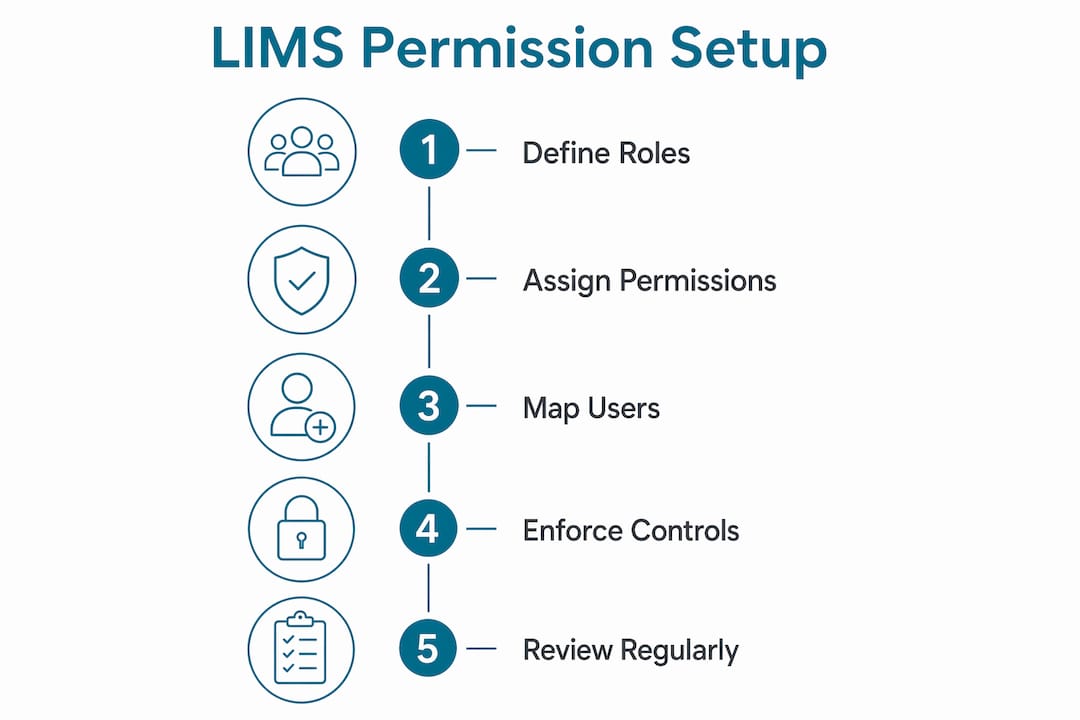
LIMS user permission setup is defined as a hierarchical structure of roles assigned specific access rights, with individual users then mapped to those roles based on their job functions. This model separates the definition of permissions from the assignment of people, which makes administration far simpler and audits far cleaner. Rather than configuring rights for each person individually, lab administrators define a role once and apply it consistently.
The practical impact is significant. A Lab Technician role might carry read and write access to sample entry screens but no ability to approve results. A Quality Reviewer role carries read access across workflows plus approval rights, but no ability to modify raw data. A System Administrator role controls user management and configuration but should never have access to clinical result approval. These separations are not bureaucratic formalities. They are the technical controls that regulators look for during inspections.

Genetic and molecular labs carry an additional burden. Patient genetic data is among the most sensitive information a healthcare organization handles. A misconfigured permission that allows a technician to view or export patient records outside their workflow creates both a HIPAA exposure and a data integrity risk. Getting the LIMS access control setup right from the start prevents both categories of harm.
What are typical LIMS user roles and their responsibilities?
Most LIMS deployments in genetic and molecular labs use five core roles. Each role carries a defined set of permissions that reflects the job function it supports.
| Role | Typical Permissions | Example Actions |
|---|---|---|
| Lab Technician | Read, write (sample entry) | Log samples, update accessioning records |
| Analyst | Read, write (results entry) | Enter test results, attach instrument data |
| Quality Reviewer | Read, approve | Review results, sign off on reports |
| Lab Manager | Read, write, configure workflows | Manage queues, view all data, adjust workflows |
| System Administrator | User management, system configuration | Create roles, reset passwords, configure audit settings |
The principle of least privilege governs this structure. Best practice grants users exactly the rights they need for their job function and nothing more. This approach reduces the attack surface for both external threats and internal errors. A technician who cannot approve results cannot accidentally or deliberately validate data they did not generate.
Role definitions should map directly to job descriptions. When a lab hires a new analyst, the onboarding process should include assigning the Analyst role in the LIMS, not negotiating a custom permission set. Custom permissions create audit complexity and increase the risk of granting excessive access. Predefined roles keep the system consistent and the audit trail clean.
Pro Tip: Review your role definitions every time you update a job description. If the job changes, the LIMS role should change with it.
Why does LIMS need configurable user permissions and granular access control?
Configurable permissions exist because no two labs have identical workflows, and because regulatory requirements demand technical enforcement, not just written policies. A lab that documents a segregation of duties policy but does not enforce it in the LIMS configuration will fail an audit. Auditors focus on technical enforcement of access controls, not procedural promises.
The risks of inadequate permission control fall into three categories:
- Data integrity violations. When users can modify data outside their designated workflow, the chain of custody for test results breaks down. FDA 21 CFR Part 11 requires that electronic records be attributable, legible, contemporaneous, original, and accurate. Shared accounts and over-permissioned roles undermine every one of those requirements.
- Permission creep. Permission creep leads to audit failures when users accumulate rights over time through role changes, temporary access grants, or system migrations that were never cleaned up. A technician promoted to analyst who retains technician-level access to administrative functions is a classic example.
- Shared and generic accounts. Audit trails fail when shared accounts are used because no action can be attributed to a specific individual. Regulators treat shared accounts as a critical finding, not a minor observation.
GDPR and HIPAA both require that access to personal data be limited to those with a legitimate need. In a genetic testing lab, that means the permission structure must reflect the actual data flow, not a generic template borrowed from a clinical chemistry lab. Managing sensitive patient data securely requires permissions that match the specific sensitivity of genetic information.
Pro Tip: Treat any shared or generic account as a critical finding waiting to happen. Disable them before your next inspection, not after.
What are common LIMS user permission structures and how to configure them effectively?
Configuring LIMS permissions effectively requires a structured approach from the start. Failing to design a hierarchical permission structure early leads to major security risks and growing complexity as lab staff increases. The following steps reflect current best practice for genetic and molecular labs.
- Define your role library first. List every job function in the lab and map each one to a set of required system actions. Do not start by creating user accounts. Start by creating roles.
- Enforce segregation of duties at the configuration level. Segregation of duties must be enforced by the LIMS through mutually exclusive workflow assignments. The person who enters a result must not be the same person who approves it. Configure the system to make this technically impossible, not just procedurally discouraged.
- Set password policies that meet regulatory minimums. Complexity requirements, expiration intervals, and password reuse restrictions should all be configured in the LIMS. ISO/IEC 17025 and FDA 21 CFR Part 11 both expect documented and enforced password controls. Review your LIMS password and security settings as part of your initial configuration checklist.
- Map every user to a role, never to individual permissions. Individual permission assignments bypass the role structure and create exceptions that are difficult to audit. If a user needs a permission that no existing role covers, create a new role rather than adding a one-off exception.
- Enable and test audit trail logging before go-live. Every user action that creates, modifies, or deletes a record must be logged with a unique user ID, a timestamp, and a description of the change. Test audit trail completeness during validation, not after your first inspection.
Pro Tip: Run a simulated audit on your permission configuration before go-live. Have someone attempt to approve a result using a Technician account. If the system allows it, your configuration has a gap.
How to maintain and audit LIMS user permissions to ensure ongoing compliance?
Permission setup is not a one-time event. Genetic and molecular labs experience staff turnover, role changes, system updates, and regulatory revisions that all affect the validity of the permission structure. Ongoing maintenance is the difference between a lab that passes inspections and one that collects findings.
Key maintenance practices include:
- Conduct formal access reviews at least annually. Compliance guidance mandates documented data integrity readiness reviews after major changes to confirm that roles still align with regulations and operations. Annual reviews catch permission creep before it becomes an audit finding.
- Disable accounts immediately upon staff departure. Terminated employees with active LIMS accounts represent both a security risk and a compliance violation. Build account deactivation into your offboarding checklist.
- Review permissions after every system update or upgrade. Software updates can reset configurations or introduce new permission categories. Validate the permission structure after every change to the system.
- Document your permission configuration for inspectors. Maintain a current record of all roles, their assigned permissions, and the users mapped to each role. This document should be available during any regulatory inspection.
- Avoid dual-role conflicts. A user assigned to both the Analyst and Quality Reviewer roles can approve their own work. The LIMS configuration should prevent this, but manual review catches cases where role boundaries were not enforced technically.
The role of LIMS in lab compliance extends well beyond software configuration. Permission management sits inside a broader quality management system. Treat it as a living document, not a completed task.
Key Takeaways
Effective LIMS user permission setup requires a hierarchical role structure, technical enforcement of segregation of duties, and continuous maintenance to remain audit-ready.
| Point | Details |
|---|---|
| Define roles before users | Build a role library mapped to job functions before creating any user accounts. |
| Enforce segregation of duties technically | Configure the LIMS to make conflicting actions impossible, not just procedurally discouraged. |
| Eliminate shared accounts | Every user must have a unique login; shared accounts invalidate audit trails and trigger regulatory findings. |
| Conduct annual access reviews | Review all role assignments at least once per year to catch permission creep before inspections do. |
| Document everything for inspectors | Maintain a current record of roles, permissions, and user assignments available for any audit. |
The permission gap most labs discover too late
The most common audit finding I see in genetic and molecular labs is not a missing policy. It is a gap between what the policy says and what the LIMS actually enforces. A lab will have a beautifully written segregation of duties procedure, and then an inspector will log in with a technician account and approve a result in thirty seconds. That finding is not a paperwork problem. It is a configuration failure.
The second pattern I see regularly is permission creep that accumulated over years of staff changes. A senior technician gets promoted, keeps the old role, and gains the new one. Nobody removes the original access because the process for doing so was never formalized. Three years later, that person has access to half the system with no documented justification.
The fix is not complicated, but it requires treating permission management as an operational discipline rather than an IT task completed at go-live. Labs that schedule quarterly permission reviews, tie account changes to HR workflows, and test their configurations before inspections almost never collect access-control findings. Labs that treat the LIMS permission setup as done after implementation almost always do. The difference is not technical sophistication. It is operational consistency.
— Tarek
How Labrynix supports LIMS permission management for genetic labs
Labrynix is built specifically for genetic testing and molecular diagnostic labs, and its LIMS permission management features reflect that focus. The platform supports configurable role-based access control, individual user audit trails, password policy enforcement, and workflow-level segregation of duties. Lab managers can define roles that match their actual job functions, map users to those roles, and maintain a complete audit log of every system action tied to a unique user ID.
For labs building toward FDA 21 CFR Part 11 or ISO/IEC 17025 compliance, Labrynix provides the technical infrastructure to support those requirements. The genetic testing lab software includes permission configuration tools designed around the workflows genetic and molecular labs actually run, not generic clinical templates. Contact Labrynix to see how the platform fits your lab's compliance and access control needs.
FAQ
What is LIMS user permission setup?
LIMS user permission setup is the process of defining roles with specific access rights and mapping individual users to those roles within a Laboratory Information Management System. It controls who can view, enter, modify, and approve lab data.
What roles are typically included in a LIMS permission structure?
Most LIMS deployments include Lab Technician, Analyst, Quality Reviewer, Lab Manager, and System Administrator roles, each with permissions matched to their job function and workflow responsibilities.
Why do auditors flag LIMS permission issues so frequently?
Auditors focus on technical enforcement of access controls, not written policies. Shared accounts, permission creep, and missing audit trails are among the most common data integrity findings in FDA 483 observations.
How often should LIMS user permissions be reviewed?
Access reviews should occur at least annually and after any major staff change, system update, or regulatory revision to confirm that role assignments remain accurate and compliant.
What is the principle of least privilege in LIMS?
The principle of least privilege means granting each user exactly the rights required for their job function and nothing more. It reduces the risk of unauthorized data access and simplifies audit trail review.