
LIMS test result unit configuration is the process of specifying measurement units, reference ranges, demographic filters, and conversion rules for every test a laboratory runs. Done correctly, it protects data integrity, supports regulatory compliance, and eliminates the manual rework that slows genetic and molecular diagnostic labs down. Platforms like STARLIMS, Oracle Clinical One, and Labrynix each approach this configuration differently, but the underlying principles are the same. This guide walks you through prerequisites, a step-by-step setup process, common mistakes, and best practices built specifically for molecular and genetic testing workflows.
What does a LIMS test result unit configuration guide actually cover?
A LIMS test result unit configuration guide covers four interconnected layers: unit definitions, reference ranges, conversion rules, and validation logic. These layers work together to make sure a result reported as 5.2 mmol/L means the same thing in your LIMS, your report, and your provider portal. Miss one layer and you introduce ambiguity that compounds across every downstream workflow, from billing to clinical review.
The industry term for this work is result parameter configuration, sometimes called test result master data setup. The phrase "unit configuration" is widely used by lab personnel, but the formal scope is broader. It includes not just units but the full set of rules that govern how a result is captured, stored, converted, and displayed.

Getting this right matters more in genetic and molecular diagnostics than in routine chemistry. PGx results, copy number variants, and allele frequency values carry clinical weight. A misconfigured unit or a missing demographic filter on a reference range can produce a result that looks valid but flags incorrectly for a provider.
What prerequisites and master data do you need before configuration?
Effective LIMS setup begins with mapping the sample-to-report lifecycle before touching any configuration screen. Labs that skip this step end up encoding their current inefficiencies into the software. That is harder to fix than starting over.
Before you open any configuration module, gather and validate the following master data:
- Test methods and analytes: Each method needs a defined scope including analytes, detection limits, quantification limits, and the units associated with each result field.
- Reference ranges: Lab normals require low and high values, plus demographic filters for age, gender, and in some cases race or ethnicity. For creatinine, for example, the low range is 24 and the high is 174, with age and gender adjustments applied.
- Unit lookup tables: Build a master list of every unit your lab uses. Common units in molecular and genetic labs include g/dL, mg/dL, U/L, and mmol/L. Standardize spelling and abbreviations now to avoid lookup mismatches later.
- Regulatory method linkages: Test methods should link to their regulatory requirements. Grouping related methods together, the way environmental labs group metals methods under EPA 200.8, simplifies management and audit readiness.
- Legacy data mapping: Clean, standardized source data is the foundation of accurate configuration. Map every legacy field to its new system equivalent using real test data before migration begins. Garbage-in, garbage-out is not a cliché here. It is a compliance risk.
Pro Tip: Build your workflow map as a visual diagram, not a text document. Seeing the sample-to-report path as a flowchart makes it far easier to spot where unit conversions or reference range checks need to happen before you configure anything.
Keep in mind that LIMS implementation projects often take 6–18 months and cost 2–3 times the initial license estimate due to customization, data mapping, and validation layers. Front-loading your master data work compresses that timeline significantly. For a structured planning approach, the LIMS implementation timeline for molecular labs is a useful reference before you begin.
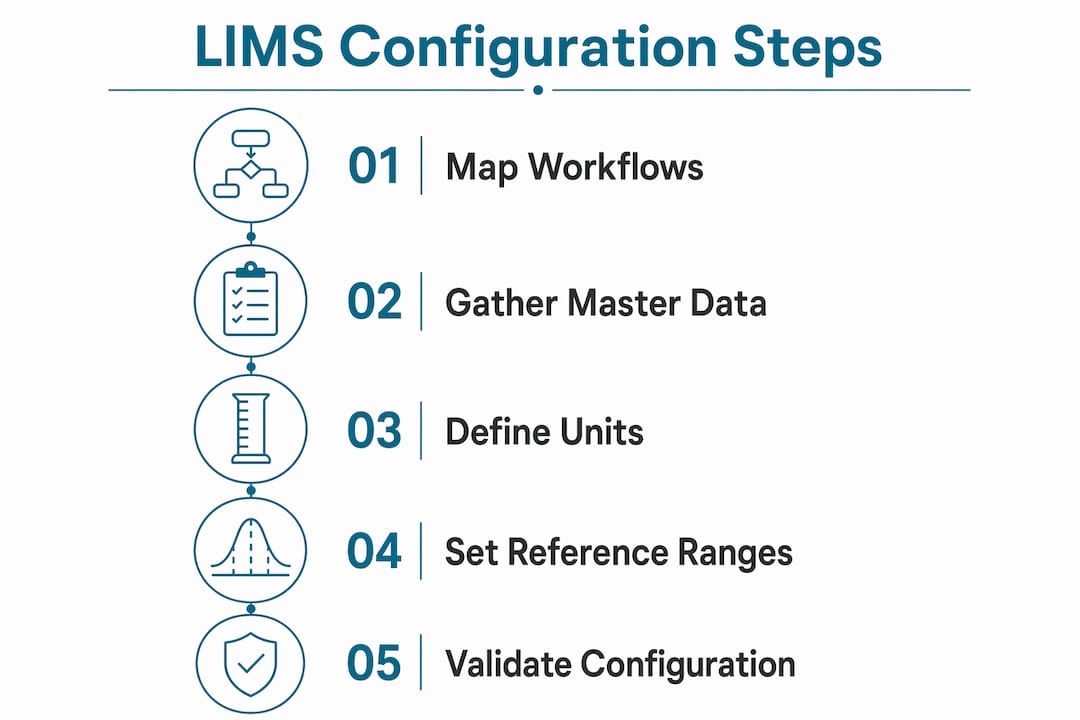
How to configure LIMS test result units step by step
This process applies to any modern LIMS, whether you are working in STARLIMS, Oracle Clinical One, Labrynix, or another platform. The sequence matters. Skipping ahead to validation before your conversion rules are set will produce misleading test results during your checks.
-
Define test parameters and select units. For each test, assign the result unit from your master lookup table. Use the unit the instrument reports natively where possible. Common choices for molecular labs include copies/mL for viral load, ng/mL for drug metabolites, and ratio or percentage for allele frequency. Locking units to the lookup table prevents free-text entry that breaks downstream logic.
-
Set reference ranges with demographic filters. Enter low and high normal values for each test. Apply demographic filters where clinically required. A reference range without age and gender filters on a creatinine or testosterone result is not just imprecise. It is a compliance gap. Most platforms support tiered range tables that apply the correct range automatically based on patient demographics pulled from the order.
-
Implement unit conversion rules. Modern LIMS store results in normalized base units and display localized units via conversion rules. Glucose, for example, converts from mmol/L to mg/dL by multiplying by 18. Define your base unit first, then configure the display conversion. This approach means your database stays consistent even when different providers or portals request different display formats.
-
Apply validation rules and business logic. This is where platforms diverge most. STARLIMS supports low-code scripting via a UI wizard that lets lab personnel automate business rules for test result display without writing full code. Labrynix uses configurable workflow rules that can flag out-of-range results, trigger review queues, or block report release until validation criteria are met. Define your rules based on your workflow map, not the platform defaults.
-
Test with real data and instrument integration. Validation must include data flow from actual instruments and external system integration checks. Run a set of known samples through the full workflow. Confirm that units display correctly in the LIMS, in generated reports, and in any connected portal or EMR. Document every test case and its result.
Pro Tip: Run your validation set twice: once with values inside the reference range and once with deliberate out-of-range values. The second pass confirms that your flags, alerts, and review queue triggers fire correctly, not just that normal results pass through cleanly.
What are the most common mistakes in LIMS unit setup?
Most configuration errors in genetic and molecular labs fall into five categories. Each one is preventable with the right process.
-
Relying on default system settings. Default LIMS settings are built for generic lab use. They rarely reflect the specific business rules a molecular or genetic testing lab needs. Accepting defaults without review means your result display, flagging logic, and conversion rules may not match your clinical or regulatory requirements.
-
Configuring before mapping workflows. Automating a broken process just makes it break faster. Labs that configure their LIMS before documenting their actual workflows end up with a system that reflects old habits rather than optimized practice. Map first, configure second.
-
Importing dirty legacy data. Poorly structured legacy data causes systemic inaccuracies that are difficult to trace after go-live. Early field mapping with real test data preserves audit trails and data accuracy. Do not assume your legacy system's unit labels match your new system's lookup table entries. Verify every field.
-
Ignoring demographic requirements for reference ranges. Genetic and molecular labs frequently run tests where age and gender materially affect the clinical interpretation. Configuring a single flat reference range for a test that requires demographic stratification produces results that look valid in the system but are clinically misleading.
-
Treating the configuration document as a one-time deliverable. A configuration document that records master data, workflows, and customizations is a living asset, not a project artifact. Labs that archive it after go-live struggle during audits, upgrades, and troubleshooting.
The labs that handle LIMS upgrades most smoothly are the ones that kept their configuration document current from day one. When a new version ships, they know exactly what was customized and why. Labs without that document spend weeks reverse-engineering their own system.
How do configuration approaches compare across modern LIMS platforms?
Not all configuration methods carry the same tradeoffs. The table below compares three common approaches used in genetic and molecular diagnostic labs.
| Approach | Flexibility | Configuration Complexity | Upgrade Impact |
|---|---|---|---|
| Manual configuration (no scripting) | Low | Low | Minimal |
| Low-code customization (e.g., STARLIMS Spec Schemas) | High | Medium | Moderate |
| Vendor-specific workflow tools (e.g., Labrynix rules engine) | High | Low to Medium | Low when documented |
Manual configuration works for simple labs with stable, low-volume test menus. It breaks down quickly when you add demographic-filtered reference ranges, multi-unit display requirements, or complex PGx result logic.
Low-code customization, as used in STARLIMS, gives lab personnel direct control over business rules through a UI wizard. This reduces IT dependency and speeds up iteration. The tradeoff is that heavily customized LIMS become harder to upgrade. Scalable, configurable workflow layers improve flexibility and reduce that risk.
Vendor-specific tools built for molecular diagnostics, like those in Labrynix, are designed around the specific result types and reporting requirements genetic labs produce. They reduce the configuration burden by starting from a domain-relevant baseline rather than a generic one. For labs generating PGx reports, that baseline difference is significant.
Pro Tip: Group related test methods and units together in your configuration, the way you would organize a catalog. All pharmacogenomics panels in one group, all infectious disease PCR panels in another. This makes bulk updates, audits, and new test onboarding far faster than managing methods individually.
For labs that want to see how unit configuration connects to downstream output, the LIMS reporting dashboard configuration examples from Labrynix show how result data flows from unit setup into report display.
Key takeaways
Correct LIMS test result unit configuration requires clean master data, mapped workflows, demographic-aware reference ranges, and validated conversion rules before any go-live.
| Point | Details |
|---|---|
| Map workflows before configuring | Document the sample-to-report lifecycle first to avoid encoding inefficiencies into your LIMS. |
| Build a complete master data set | Compile unit lookup tables, reference ranges with demographic filters, and regulatory method linkages before setup begins. |
| Use normalized base units | Store results in base units and apply conversion rules for display to keep your database consistent across portals and reports. |
| Validate with real data | Test with both in-range and out-of-range samples to confirm that flags, conversions, and review triggers all fire correctly. |
| Maintain a living configuration document | Keep your configuration record current to support audits, upgrades, and troubleshooting throughout the system's life. |
Why early workflow mapping changes everything
I have seen labs spend months configuring a LIMS only to discover at go-live that the system reflects how they used to work, not how they want to work. The configuration was technically correct. The workflow it encoded was not. That is the most expensive mistake in this process, and it is entirely avoidable.
My strongest recommendation is to treat workflow mapping as a non-negotiable prerequisite, not a preliminary formality. Sit with your bench technicians, your lab directors, and your reporting team before you open a single configuration screen. Draw the actual sample-to-report path. Find the handoffs where unit conversions happen, where reference range checks matter, and where result flags need to trigger a review. Then configure around that reality.
Low-code customization tools have genuinely changed what lab personnel can do without IT support. STARLIMS Spec Schemas and Labrynix's rules engine both let you implement complex business logic through a UI rather than a development ticket. Use that capability. But use it to solve real workflow problems, not to replicate what your old system did.
The configuration document is the piece most labs undervalue. I treat it as the lab's institutional memory for its LIMS. Every unit definition, every conversion rule, every demographic filter, and every custom business rule should live there with a note explaining why it was set that way. When an upgrade ships or a new test is added, that document is the difference between a two-hour update and a two-week investigation.
Finally, test relentlessly with real data. Known samples with known results are your ground truth. If your configured system does not reproduce those results accurately, the configuration is wrong regardless of how clean it looks in the UI.
— Tarek
How Labrynix simplifies unit configuration for molecular labs
Configuring test result units in a LIMS built for genetic and molecular diagnostics should not require workarounds designed for generic clinical labs.

Labrynix is built specifically for PGx, molecular diagnostic, and genetic testing workflows. The platform supports master data setup, unit lookup management, demographic-filtered reference ranges, and configurable workflow rules in one connected system. Audit-ready documentation and role-based access are built into the workflow, not added on afterward. If you are evaluating your current setup or planning a new implementation, explore Labrynix LIMS solutions for genetic and molecular labs to see how purpose-built configuration tools change the process.
FAQ
What is LIMS test result unit configuration?
LIMS test result unit configuration is the process of defining measurement units, reference ranges, demographic filters, and conversion rules for each test in a laboratory information management system. It governs how results are captured, stored, converted, and displayed across workflows and reports.
What master data do you need before configuring LIMS units?
You need a complete list of test methods and analytes, a unit lookup table, reference ranges with demographic filters, regulatory method linkages, and clean legacy data mapped to new system fields before configuration begins.
How do unit conversion rules work in a LIMS?
Modern LIMS store results in a normalized base unit and apply conversion rules to display localized units. Glucose, for example, is stored in mmol/L and displayed as mg/dL by multiplying by 18, keeping the database consistent regardless of display format.
Why do demographic filters matter for reference ranges?
Reference ranges for many tests in genetic and molecular diagnostics vary by age and gender. Configuring a flat range without demographic filters produces results that appear valid in the system but may be clinically misleading for specific patient populations.
How often should a LIMS configuration document be updated?
A configuration document should be updated every time a unit definition, conversion rule, reference range, or business logic rule changes. Treating it as a living record supports audits, system upgrades, and faster troubleshooting throughout the LIMS lifecycle.