Lab software management refers to the selection, deployment, and ongoing operation of systems — primarily LIMS (Laboratory Information Management Systems), ELNs (Electronic Laboratory Notebooks), and LIS (Laboratory Information Systems) — that govern how a lab tracks samples, manages workflows, stores data, and meets compliance obligations. For most regulated U.S. labs, the right starting point is an integrated LIMS with HL7/FHIR support, audit logs, role-based access control (RBAC), and HIPAA-aligned data governance. If you run genetic, molecular, or pharmacogenomics (PGx) testing, add structured reporting and clinical interpretation workflows to that list.
This guide is written for lab managers, quality leads, and operations leads who need to shortlist vendors, plan a realistic budget, and get to go-live without surprises. The sections below cover core modules, deployment tradeoffs, a vendor selection framework, implementation timelines, open-source considerations, and a focused section on what genetic and PGx labs need that generic platforms often miss. 21 CFR Part 11 compliance, HIPAA readiness, and audit trail requirements come up throughout because they are non-negotiable for most clinical and regulated environments in the United States.
Key Takeaways
Choosing the right laboratory management software requires matching the platform's data model and compliance architecture to your specific lab type before evaluating features.
| Point | Details |
|---|---|
| Start with use cases, not features | Document every workflow the software must support before talking to vendors. |
| Compliance is the baseline | Audit trails, RBAC, electronic signatures, and HIPAA alignment are non-negotiable for regulated U.S. labs. |
| Integration depth drives real ROI | HL7/FHIR support and bidirectional instrument connectivity separate functional platforms from ones that create new manual steps. |
| Specialist labs need specialist platforms | Genetic, molecular, and PGx labs require structured genotype data models and configurable clinical reporting workflows that generic LIMS platforms rarely provide. |
| Labrynix for molecular and PGx labs | Labrynix combines LIMS, PGx reporting, portals, and HL7/FHIR integrations in one platform built for genetic and molecular testing workflows. |
Table of Contents
- What does lab software management actually do day to day?
- LIMS vs. ELN vs. LIS: which product type and deployment model fits your lab?
- What features should you actually evaluate when shortlisting vendors?
- How do you choose the right laboratory management software for your lab?
- What do implementation timelines and costs actually look like?
- When does free or open-source LIMS actually make sense?
- What do genetic, molecular, and PGx labs need that generic platforms miss?
- What most lab managers get wrong about software selection
- Labrynix is built for genetic and molecular labs that need more than a generic LIMS
- Sources
What does lab software management actually do day to day?
A modern laboratory management software platform is not a single feature. It is a set of connected modules, each solving a specific operational problem. LIMS capabilities have been documented since the early days of lab automation, and the core functions have expanded considerably as labs moved from paper-based workflows to fully digital operations.
Core modules you should expect from any credible platform:
- Sample accessioning: Assigns unique identifiers at intake, captures patient/provider metadata, and starts the chain of custody immediately.
- Sample tracking: Follows each specimen through every processing step, from receipt to storage to disposal, with timestamps and operator records.
- Inventory and reagent management: Tracks lot numbers, expiration dates, and stock levels; alerts before critical supplies run out.
- Instrument scheduling: Books analyzers and sequencers, logs maintenance windows, and prevents double-booking that stalls throughput.
- ELN integration: Links experimental notes and protocols directly to sample records, so integrating LIMS and ELN reduces manual handoffs and improves traceability for inspection readiness.
- Results reporting: Generates structured output, applies QC rules, and routes results to reviewers before release.
- Audit trails: Logs every create, read, update, and delete action with user identity and timestamp — the backbone of 21 CFR Part 11 and HIPAA compliance.
- User and role management (RBAC): Restricts access by job function, preventing a technician from approving results or a billing user from editing patient records.
- Dashboards and operational analytics: Surfaces turnaround time, bottleneck queues, and workload distribution so managers can act on data rather than gut feel.
On the compliance side, U.S. labs operating under CLIA, CAP accreditation, or FDA oversight need electronic signatures that meet 21 CFR Part 11 requirements, encrypted data at rest and in transit, and configurable retention policies. For patient data security, HIPAA-aligned controls include PHI access logging, minimum-necessary access policies, and breach notification workflows.
Where HL7 and FHIR fit: incoming test orders from EMR/EHR systems typically arrive as HL7 v2 messages or FHIR R4 resources. Results leave the LIMS the same way. Labs that skip this integration end up with manual order entry — a transcription risk and a throughput ceiling. Workflow orchestration platforms can connect LIMS, ELN, instruments, and processing software to enable branching decision logic and governed data lineage across all of them.
LIMS vs. ELN vs. LIS: which product type and deployment model fits your lab?
Understanding the product categories before you start demos saves weeks of confusion.
LIMS manages the sample lifecycle: intake, tracking, testing, results, and storage. It is the operational core for clinical and regulated labs. ELN replaces paper lab notebooks: it captures protocols, experimental observations, and scientific data in a structured, searchable format. LIS is the clinical variant of LIMS, typically more tightly integrated with hospital information systems and focused on patient-facing result delivery. In practice, the lines blur — many commercial platforms combine LIMS and LIS functions, and some add ELN modules. Buyers on G2's LIMS category evaluate solutions by industry focus and feature depth, which confirms that the right product depends heavily on your lab type, not just the category label.
| Dimension | LIMS | ELN | LIS |
|---|---|---|---|
| Primary focus | Sample lifecycle and chain of custody | Scientific protocols and experimental data | Patient result delivery and clinical ordering |
| Typical users | QC, molecular, reference labs | Research and development labs | Hospital and clinical labs |
| Regulatory fit | 21 CFR Part 11, CLIA, CAP | 21 CFR Part 11, GxP | HIPAA, CLIA, HL7 |
| Integration priority | Instruments, inventory, EHR | LIMS, data repositories | EMR/EHR, billing, LIMS |
| Overlap risk | Often includes LIS features | Often paired with LIMS | Often built on LIMS core |
Deployment models each carry real tradeoffs:
Cloud (SaaS): Faster to deploy, lower upfront capital, and vendor-managed upgrades. The tradeoff is that your data lives on the vendor's infrastructure, so you need to verify their SOC 2 Type II certification, data residency policies, and business continuity SLAs before signing.
On-premises: Full control over data and infrastructure. Preferred by labs with legacy instrument drivers that require local network connectivity or by organizations with strict data sovereignty requirements. Expect higher IT overhead and longer validation cycles after upgrades.
Hybrid: Core LIMS on-premises with cloud-based portals or reporting modules. This model suits labs that need local instrument connectivity but want cloud-delivered provider and patient portals.
Commercial vs. open-source: Commercial platforms come with vendor validation packages, support SLAs, and a defined upgrade path. Open-source options (discussed in a later section) shift the validation burden entirely to your team. For regulated U.S. labs, that burden is substantial.
What features should you actually evaluate when shortlisting vendors?
Feature lists from vendors all look similar at the proposal stage. The differentiation shows up in the details.
Priority checklist by category:
Regulatory and compliance (non-negotiable):
- Tamper-evident audit trails with user, timestamp, and change reason
- Electronic signatures compliant with 21 CFR Part 11
- RBAC with configurable permission sets by role and department
- HIPAA-aligned PHI controls and access logging; see the LIMS compliance guide for a detailed breakdown
Core operations:
- Sample lineage from accessioning through final disposition
- QC rule engine with configurable pass/fail logic
- Instrument integration (bidirectional, not just one-way data pull)
- Inventory management with lot tracking and expiry alerts
Scale and analytics:
- Multi-site support with centralized reporting
- Configurable dashboards for TAT, queue depth, and error rates
- Batch processing and high-throughput accessioning
Integration and interoperability:
- HL7 v2 and FHIR R4 support with documented message types
- REST API with published documentation and sandbox access
- EMR/EHR connectivity; the LIMS vs. EHR explainer covers the integration points in detail
UX and support:
- Role-specific interfaces (a technician's queue view vs. a manager's dashboard)
- Published SLA for support response and resolution times
- Defined upgrade path and validation support for new releases
Concrete vendor questions that reveal the real picture:
- "Can you provide your IQ/OQ/PQ validation documentation for our lab type?"
- "Which HL7 message types do you support, and can we see a live integration demo?"
- "What is your SLA for critical support tickets, and what is your escalation path?"
- "How do you handle instrument driver updates when a manufacturer changes firmware?"
- "Show us a sample lineage report from accessioning to result release."
Red flags to watch for: no native audit trail (only add-on logging), report templates that cannot be customized without vendor involvement, no API access to instrument data, and support contracts that exclude validation assistance after upgrades. User reviews on platforms like G2 consistently surface support responsiveness and integration depth as the two areas where vendor promises and reality diverge most.
How do you choose the right laboratory management software for your lab?
A structured selection process prevents the most common mistake: buying a platform that fits the demo but not the workflow.
-
Define your use cases in writing. List every workflow the software must support: order intake, accessioning, sample tracking, instrument scheduling, result review, report generation, and data export. Separate must-haves from nice-to-haves before you talk to any vendor.
-
Map must-have features to your regulatory obligations. A CLIA-certified clinical lab has different documentation requirements than an academic research lab. Identify which regulations apply (CLIA, CAP, 21 CFR Part 11, HIPAA) and confirm each vendor can demonstrate compliance, not just claim it.
-
Assess integration requirements early. List every instrument, EMR/EHR, billing system, and external application the LIMS must connect to. Ask each vendor for a documented integration matrix. Lab workflow design guidance covers how to map these touchpoints before procurement.
-
Run a focused pilot. Scope the pilot to two or three real workflows using actual sample types. Set measurable success criteria: accessioning error rate, TAT for a defined test panel, and user acceptance from at least three staff roles. Timebox it to 30 days. A vendor who resists a structured pilot is telling you something.
-
Score vendors on a consistent rubric. Use a scorecard with weighted fields: fit for purpose, compliance evidence, integration depth, total cost of ownership, support SLA, and product roadmap transparency. Weight compliance and integration highest for regulated clinical labs.
-
Validate vendor claims during the demo. Ask to see audit trail entries for a specific sample edit. Request a live HL7 message exchange. Ask the support team — not the sales team — to walk you through an upgrade validation scenario.
Pro Tip: Request a reference from a lab in your specific category (molecular, PGx, clinical chemistry) rather than a generic reference. A glowing testimonial from a food safety lab tells you almost nothing about how the platform handles genetic testing workflows.
What do implementation timelines and costs actually look like?
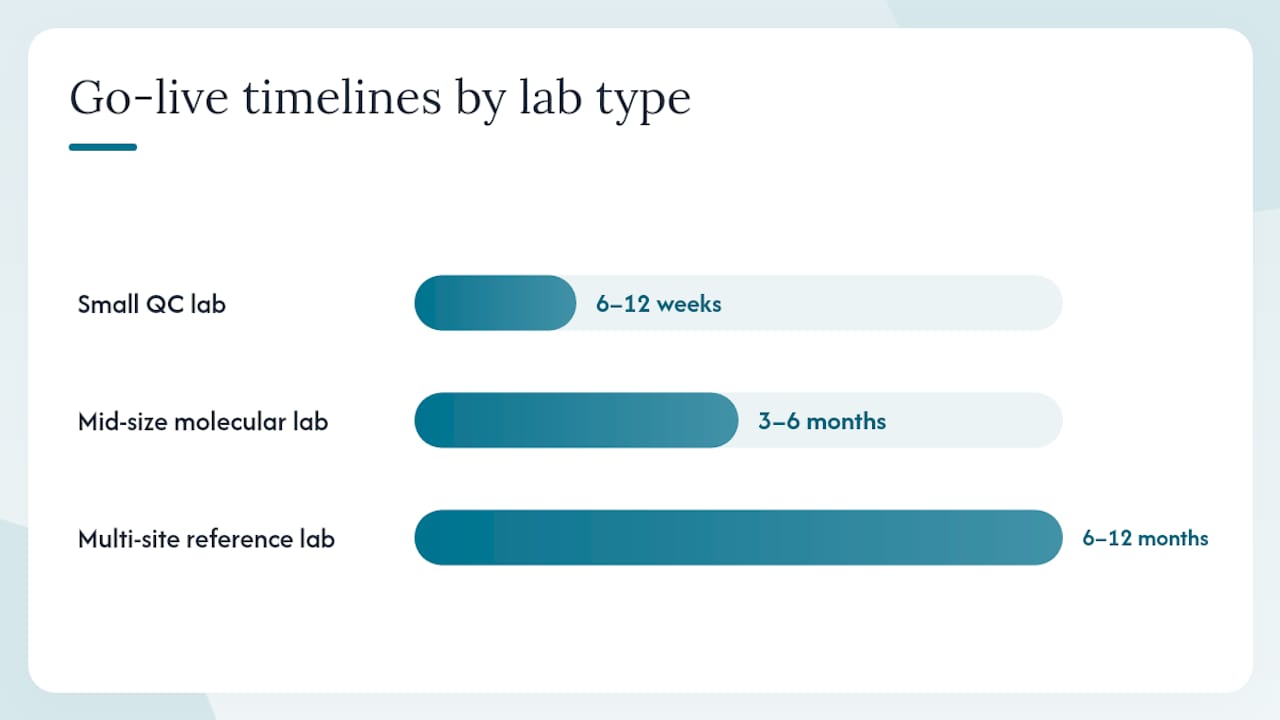
Timelines vary more than vendors typically advertise. Here is a realistic breakdown by lab complexity:
| Lab type | Typical go-live timeline | Key milestone checkpoints |
|---|---|---|
| Small QC or single-discipline lab | 6–12 weeks | Requirements sign-off, configuration, UAT, go-live |
| Mid-size molecular or clinical lab | 3–6 months | Requirements, instrument integration, data migration, validation, training, go-live |
| Multi-site reference lab | 6–12 months | Phased rollout by site, centralized reporting setup, full integration validation |
Primary cost drivers (beyond the subscription or license fee):
- Configuration and validation: Custom workflow setup and IQ/OQ/PQ documentation. For regulated labs, this is often the largest single cost item.
- Instrument integrations: Each bidirectional interface typically requires development, testing, and validation. Budget per interface, not as a flat fee.
- Data migration: Moving historical sample records, patient data, and QC results from a legacy system or spreadsheets. Underestimated in almost every project.
- User training: Initial training plus refresher cycles after upgrades. Factor in lost productivity during the learning curve.
- Custom reports: Branded result reports, PGx summaries, or regulatory submission formats that go beyond standard templates.
- EHR/EMR interfacing: HL7 or FHIR integration with hospital or clinic systems often requires coordination with the EHR vendor, adding time and cost.
Budgeting rules of thumb: SaaS subscriptions typically run on annual contracts with per-user or per-volume pricing. One-time implementation costs (configuration, validation, migration, training) often equal or exceed the first year's subscription fee for mid-size labs. Perpetual license models shift cost to upfront capital plus an annual maintenance fee, usually 18–22% of the license price, covering support and upgrades.
Post-launch, budget for ongoing validation rework after major platform upgrades, periodic security audits, and support contract renewals. SaaS vendors typically include upgrades in the subscription, but validation of those upgrades is your lab's responsibility.
Pro Tip: Ask every vendor for a total cost of ownership estimate that includes implementation services, first-year support, and the cost of one major upgrade validation. The delta between vendors often looks very different at that level than it does comparing subscription fees alone.
When does free or open-source LIMS actually make sense?
Open-source LIMS platforms can be a legitimate starting point, but the conditions where they work are narrower than their advocates suggest.
Where open-source fits:
- Academic or research labs with in-house software developers who can configure, validate, and maintain the system
- Pilot projects where the goal is to test a workflow concept before committing to a commercial platform
- Labs with very limited budgets and no regulatory obligation to maintain vendor-supplied validation documentation
Practical limitations that matter for regulated U.S. labs:
- No vendor-supplied IQ/OQ/PQ validation packages. Your team writes and executes all validation documentation, which is a significant resource commitment under 21 CFR Part 11.
- Integration support is community-dependent. HL7 and FHIR connectors may exist but are rarely production-tested at scale.
- Feature development follows community priorities, not your lab's roadmap. Critical compliance updates can lag.
- Security patching is your responsibility. A vulnerability in an open-source dependency does not come with a vendor SLA.
Signals that it is time to migrate to a commercial platform:
- Your lab is pursuing CLIA certification or CAP accreditation
- You are adding clinical genetic testing or PGx reporting to your menu
- Instrument integrations are becoming a bottleneck
- Your team is spending more time maintaining the software than running the lab
When evaluating an open-source project's long-term viability, check the frequency of commits in the last 12 months, the size of the active contributor community, the availability of commercial support contracts, and whether the project has documented a compliance roadmap. A project with infrequent commits and no commercial backing is a migration risk, not a cost saving.
What do genetic, molecular, and PGx labs need that generic platforms miss?
Genetic and pharmacogenomics labs operate at a different level of reporting complexity than most clinical labs. A generic LIMS handles sample tracking well. It rarely handles structured genotype data, variant interpretation workflows, or the kind of provider-facing PGx reports that clinicians actually use to make prescribing decisions.
Must-haves for molecular and PGx labs:
- Structured genotype and variant data models: The system must store allele calls, diplotype assignments, and phenotype predictions in structured fields, not free text.
- Configurable report templates: PGx reports need branded layouts, gene-drug interaction tables, CPIC guideline citations, and patient-specific summaries. Templates that cannot be customized without vendor intervention are a bottleneck.
- Clinical interpretation workflows: A documented review and approval chain, with audit trail entries for each step, is required for clinical reporting. The lab director's electronic signature must be traceable to the specific report version released.
- CPIC, PharmGKB, and FDA reference support: Reports that cite current CPIC guidelines and FDA pharmacogenomic labeling need a mechanism to update those references when guidelines change, without manual reformatting.
- PHI controls and consent tracking: Genetic data carries heightened sensitivity. Patient consent records, PHI access logs, and data retention policies need to be configurable at the test and patient level.
Integration examples specific to molecular labs:
- HL7 v2 OML/ORL messages for order intake from ordering providers; FHIR R4 DiagnosticReport resources for structured result delivery
- Instrument connectivity for next-generation sequencers, PCR platforms, and microarray analyzers, with bidirectional data flow and governed lineage
- EMR portal integration so ordering providers can view results without logging into the LIMS directly
- Billing system APIs for claim status visibility and revenue cycle handoffs
Labrynix is built specifically for this environment. The platform's LIMS for genetic and molecular labs covers accessioning, sample tracking, workflow queues, user roles, and audit logs designed for molecular testing workflows. Labrynix's molecular diagnostics solution adds PGx report generation with customizable templates, AI-assisted summaries, CPIC guideline support, PharmGKB-informed annotations, and FDA pharmacogenomic labeling references. Provider and patient portals, HL7/FHIR integration, and role-based access controls are built into the platform rather than bolted on as add-ons.
For labs evaluating laboratory quality control alongside software selection, the compliance architecture of the platform matters as much as the feature set.
What most lab managers get wrong about software selection
The conventional wisdom says: pick the platform with the longest feature list and the most integrations. After watching labs go through this process, the real failure mode is almost never a missing feature. It is a mismatch between the platform's data model and the lab's actual workflow.
A LIMS built for environmental testing has a fundamentally different sample model than one built for clinical genetic testing. You can configure your way around some of that gap, but over-customization is where implementations stall. Every custom field, every non-standard workflow rule, and every bespoke report template becomes a validation item and a maintenance burden. Labs that spend the first six months of implementation customizing a generic platform to fit molecular workflows would have been better served by a domain-specific platform from day one.
The second underestimated factor is change management. Software does not fail at go-live because of bugs. It fails because staff revert to spreadsheets and paper logs when the new system feels harder than the old one. Training is not a one-time event at launch. It is a structured program that runs through the first 90 days, with designated power users in each department who can answer questions without escalating to IT.
The labs that get the most out of their investment are the ones that treat the software selection as a workflow redesign project, not a technology procurement. Define the workflow first. Then find the platform that fits it.
Labrynix is built for genetic and molecular labs that need more than a generic LIMS
Generic LIMS platforms handle sample tracking. Labrynix handles the full picture: from order intake and accessioning through PGx report generation, provider portal delivery, billing visibility, and HL7/FHIR integration with your ordering systems. That is a meaningful difference for a lab whose primary deliverable is a clinical pharmacogenomics report, not a simple numeric result.
Labs evaluating Labrynix should request a demo that covers: PGx report template customization and approval workflows, a live HL7/FHIR order-to-result exchange, validation documentation for your lab type, support SLA terms, and the upgrade path for major releases. The Labrynix LIMS product page and the PGx reporting module cover the feature set in detail. For labs running hereditary cancer testing, molecular diagnostics, or precision medicine panels, the genetic testing lab solution page maps the platform to your specific workflow requirements.
Schedule a technical review with the Labrynix team to walk through your current workflow and see where the platform fits.
Sources
- Workflow Orchestration for Analytical Labs | ZONTAL
This article is general information, not a substitute for advice from a qualified doctor. Consult a qualified healthcare professional about your own circumstances before acting on anything here.