
Workflow software for the sample-to-report process is the systematized automation of genetic testing and molecular diagnostic operations that transforms raw sample data into finalized clinical reports with speed, accuracy, and full auditability. Labs that have adopted purpose-built report generation software have seen reporting time drop from 15 hours per week to under 5 minutes. That is not an incremental improvement. It is a structural change in how a lab operates. Platforms like Labrynix, NextReport Engine, Dapr Workflow, and n8n each address different layers of this challenge, and understanding where they fit is the first decision your lab needs to make.
What are the critical stages of a sample-to-report workflow in genetic testing labs?
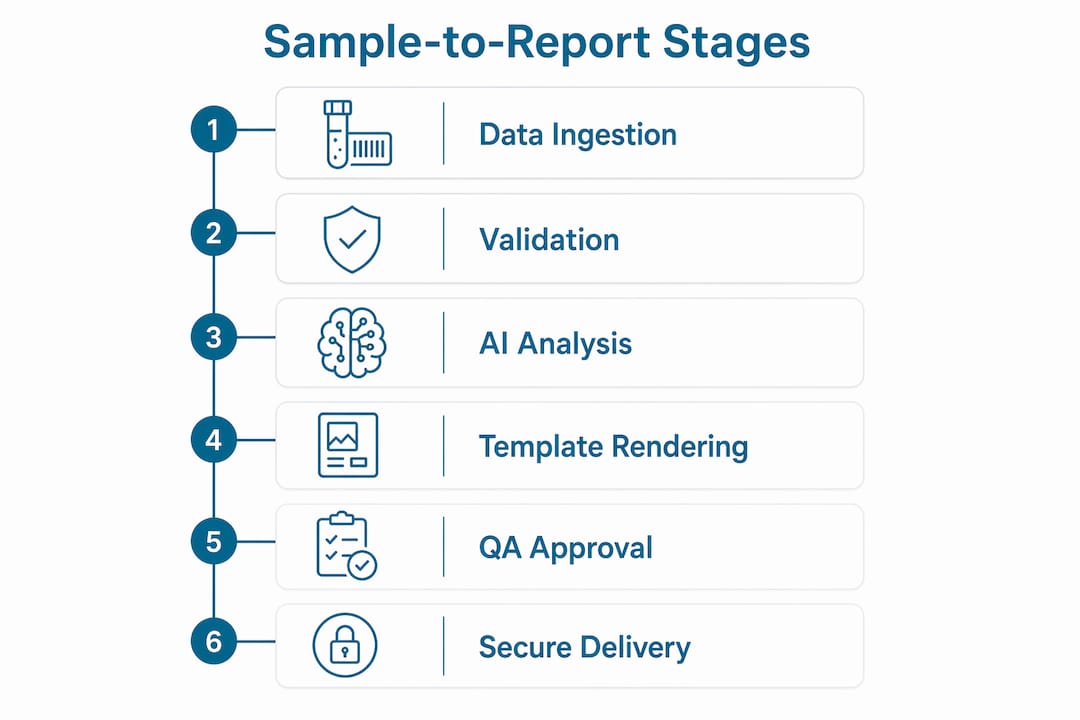
The six sequential stages of a modern sample-to-report workflow are data ingestion, validation and transformation, AI-assisted analysis, template-based rendering, QA approval, and secure automated delivery. Each stage is a dependency for the next, which means a failure or gap at any point corrupts the output downstream. Understanding this architecture is the foundation for evaluating any workflow management tool.
Data ingestion is where raw sample data enters the system, typically from instruments, LIMS order queues, or HL7/FHIR feeds. The quality of your ingestion layer determines everything that follows. If your software cannot reliably parse and route incoming data from multiple sources, no amount of downstream automation compensates.
Validation and transformation converts raw instrument output into structured, report-ready data. This stage enforces data integrity rules, flags anomalies, and maps values to standardized schemas. Labs running pharmacogenomics panels, for example, must reconcile diplotype calls against CPIC guidelines before any report template receives the data.
AI-assisted analysis is where platforms like Labrynix Intelligence add genuine value. Rather than a lab scientist manually cross-referencing PharmGKB annotations or FDA pharmacogenomic labeling, the system applies pre-configured interpretation rules and surfaces draft summaries for clinical review. This stage accelerates turnaround without removing the scientist from the approval chain.

The final three stages, template rendering, QA approval, and secure delivery, convert analyzed data into a formatted report, route it through a defined review queue, and push the finalized document to providers or patients through a secured portal. The table below maps each stage to its core function and the failure risk if skipped.
| Stage | Core function | Risk if skipped |
|---|---|---|
| Data ingestion | Receives and routes raw sample data | Incomplete or misrouted inputs |
| Validation and transformation | Enforces data integrity and schema mapping | Corrupt or non-standard report data |
| AI-assisted analysis | Applies interpretation rules and draft summaries | Manual bottlenecks and inconsistent annotations |
| Template rendering | Formats validated data into branded report output | Unstructured, non-compliant report documents |
| QA approval | Routes reports through clinical review queues | Unreviewed reports reaching providers |
| Secure delivery | Delivers finalized reports to providers and patients | Data exposure or delivery failures |
Which key features must workflow software have to optimize sample-to-report processes in labs?
Labs operate in two primary reporting models: embedded API-driven reporting integrated directly into LIMS or EMR systems, and self-service drag-and-drop template design for clinical staff. The right choice depends on your lab's technical capacity and compliance requirements. Most high-volume genetic labs need both, with API-driven generation handling automated report production and self-service tools supporting template customization by lab directors.
The single most important capability to evaluate is API-first architecture. Prioritizing API-first capabilities over visual editors produces reproducible reports from JSON schemas, which matters far more than aesthetic flexibility in a regulated clinical environment. A report generated programmatically from a validated schema can be audited, versioned, and reproduced on demand. A report assembled manually in a drag-and-drop editor cannot make the same guarantee.
Durable execution is the second non-negotiable feature. Durable execution means the workflow engine recovers from a failure at the exact step where it broke, rather than restarting the entire pipeline. For a PGx lab processing hundreds of samples daily, a full pipeline restart on every network timeout is operationally unacceptable and introduces data consistency risks.
Security architecture deserves equal weight. Gateway-hosted runtimes enforce code-based permission sets that restrict privileged actions during report generation, protecting sensitive patient data from exposure at the workflow layer. This is not a feature you add later. It must be present in the architecture from day one.
Here are the must-have features for any workflow software your lab evaluates:
- API-first report generation with JSON schema support for programmatic reproducibility
- Durable, retriable pipeline execution that recovers from the exact failed step
- Role-based access controls and audit logging at every workflow stage
- Template customization with version control for molecular lab reporting
- LIMS and EMR integration via HL7, FHIR, or REST APIs
- Secure report delivery through provider and patient portals
- Workflow-as-code support in YAML or Python for testability and debugging
Pro Tip: Before signing any software contract, ask the vendor to demonstrate a failed-step recovery scenario in a live pipeline. If they cannot show you durable execution in action, assume it does not exist.
How to implement and automate a sample-to-report workflow using current software tools
Implementation follows six practical steps: define the process, select software, design templates, automate triggers, validate outputs, and configure delivery rules. Skipping the definition phase is the most common reason lab automation projects stall after go-live. You cannot automate a process you have not mapped.
Step 1: Define the process. Document every handoff in your current workflow, from order receipt through report delivery. Identify where manual steps introduce delay or variability. Labs that complete this mapping before selecting software make better purchasing decisions and faster implementations.
Step 2: Select software aligned to your architecture. The table below compares three tools relevant to lab report generation workflows.
| Tool | Primary strength | Best fit for labs |
|---|---|---|
| NextReport Engine | API-first report generation from JSON schemas | Labs needing programmatic, reproducible report output |
| Dapr Workflow | Durable orchestration with parallel execution and retries | Labs running high-volume pipelines requiring failure recovery |
| n8n | Visual workflow automation with API connectivity | Labs connecting disparate systems without deep dev resources |
Dapr Workflow, for example, orchestrates report generation by parallelizing data sourcing, aggregating results, rendering templates, storing outputs, and delivering reports, with automatic retries on any failed step. This makes it a strong orchestration layer for labs that need reliability at scale.
Step 3: Design templates with version control. Every report template should be treated as a code artifact. Workflow-as-code approaches using YAML or Python give lab teams version control, unit testing, and reproducible debugging for complex genetic data workflows. A template that cannot be versioned cannot be audited.
Step 4: Automate triggers. Connect your workflow engine to your LIMS so that sample accessioning, result finalization, or status changes automatically trigger downstream report generation. Labrynix Connect supports HL7, FHIR, webhooks, and REST APIs for exactly this kind of LIMS integration architecture.
Step 5: Validate outputs. Run parallel validation against known reference cases before going live. Every automated report should be compared against a manually verified gold standard for at least the first 30 days of production operation.
Step 6: Configure delivery rules. Define who receives which report, through which channel, and under what conditions. Labrynix provides report distribution configuration that ties delivery rules directly to workflow logic, so provider routing and patient portal delivery happen without manual intervention.
Pro Tip: Build your validation test suite before you build your workflow. If you cannot define what a correct output looks like, you cannot confirm your automation is working.
What common challenges and mistakes should labs avoid when adopting workflow software?
The most expensive mistake labs make is selecting workflow software based on the quality of its visual interface rather than the depth of its API and execution model. A polished drag-and-drop builder is easy to demo. It is much harder to audit, version, or recover when it fails in production.
No-code visual automation tools can obscure workflow logic in ways that create genuine regulatory risk for labs handling genetic data. When your workflow lives inside a node graph that only one person on your team understands, you have introduced a compliance vulnerability. Regulators expect labs to demonstrate that their processes are documented, reproducible, and independently verifiable.
A second structural risk is ignoring data architecture. Medallion data architecture ensures raw data immutability and separates report generation from unvalidated inputs, which is the foundation of auditability in any regulated lab environment. Labs that write reports directly from raw instrument output, without a validated transformation layer, cannot demonstrate data integrity under audit.
Common pitfalls to avoid:
- Choosing software without durable execution, which forces full pipeline restarts on any failure
- Deploying no-code tools without documenting the underlying logic in a reviewable format
- Skipping role-based access controls on report approval queues
- Treating report templates as static documents rather than versioned, testable artifacts
- Failing to test integration points with your LIMS or EMR before go-live
"The labs that struggle most with workflow automation are not the ones that chose the wrong software. They are the ones that automated a broken process and then scaled the breakage."
Practical troubleshooting starts with your audit log. If your workflow software does not produce a complete, timestamped log of every action at every stage, you cannot diagnose failures, satisfy compliance reviewers, or defend your process in a CAP or CLIA inspection. Audit logging is not optional infrastructure. It is the foundation of everything else.
Key takeaways
Effective sample-to-report automation in genetic labs requires API-first software, durable pipeline execution, and a medallion data architecture that keeps raw data immutable and report generation fully auditable.
| Point | Details |
|---|---|
| Six-stage workflow architecture | Every lab's software must support ingestion, validation, analysis, rendering, QA, and delivery in sequence. |
| API-first over visual editors | Programmatic report generation from JSON schemas produces reproducible, auditable outputs that visual tools cannot match. |
| Durable execution is non-negotiable | Failure recovery from the exact failed step prevents data inconsistency and pipeline restarts in high-volume labs. |
| Medallion architecture for compliance | Separating raw data from validated, processed data is the structural requirement for regulatory auditability. |
| Template versioning as code | Treating report templates as versioned code artifacts enables unit testing, debugging, and change management. |
Why I stopped trusting "easy" workflow tools in clinical reporting
I have seen labs spend six months implementing a visually impressive no-code workflow platform, only to discover during their first external audit that nobody could explain what the tool was actually doing between steps. The logic was buried in a node graph that had grown organically over months of tweaks. Nobody had documented it. Nobody could reproduce it from scratch.
The uncomfortable truth about workflow automation in genetic labs is that "easy to use" and "safe to operate in a regulated environment" are often in direct tension. The tools that are fastest to configure are frequently the hardest to audit. The tools that give you the most programmatic control require more upfront investment but pay back that investment every time a regulator asks you to demonstrate process integrity.
My practical recommendation: use visual tools for prototyping and stakeholder communication, then translate validated workflows into code before production deployment. Version control your templates. Write tests for your transformation logic. Treat your workflow the same way a software team treats production code, because in a clinical lab, it is production code. Labrynix takes this seriously by keeping clinical review, validation, and final approval under laboratory control rather than automating decisions that require human judgment.
— Tarek
See how Labrynix handles the full sample-to-report workflow
Labrynix is built specifically for genetic testing, molecular diagnostics, and pharmacogenomics labs that need more than a generic LIMS. The platform connects order intake, accessioning, sample tracking, AI-assisted PGx report generation, provider and patient portals, billing visibility, and HL7/FHIR integrations into one system designed around real lab operations. Every report generated through Labrynix Reports uses customizable templates, CPIC guideline support, PharmGKB-informed annotations, and lab-approved interpretation rules, with full audit logging and role-based approval workflows built in. If your lab is ready to move beyond disconnected tools and manual reporting, explore what Labrynix LIMS and PGx reporting can do for your sample-to-report process.
FAQ
What does workflow software for the sample-to-report process actually do?
It automates the sequential steps from raw sample data ingestion through clinical report delivery, replacing manual handoffs with triggered, auditable, and recoverable pipeline stages. The goal is consistent report output with full traceability at every step.
How long does it take to automate a sample-to-report workflow?
Implementation timelines vary by lab complexity, but most labs complete initial automation in 60 to 90 days when they start with a documented process map and a software platform that supports their existing LIMS and EMR integrations.
What is durable execution and why does it matter for lab reporting?
Durable execution means a workflow engine resumes from the exact step that failed rather than restarting the entire pipeline. For labs processing hundreds of samples daily, this prevents data inconsistency and eliminates the operational cost of full pipeline restarts caused by transient failures.
Can no-code tools handle genetic testing report workflows?
No-code tools can handle simple routing and notification tasks, but no-code visual tools in clinical workflows risk obscuring logic in ways that fail regulatory and audit requirements. Labs with complex genetic data workflows need code-driven or API-first solutions that produce verifiable, reproducible outputs.
What integration standards should lab workflow software support?
Lab workflow software should support HL7, FHIR, and REST APIs at minimum to connect with LIMS, EMR, and billing systems. You can review genetic testing terminology and data standards relevant to your lab's specific integration requirements before evaluating vendors.