
LIS reporting template customization is the process of tailoring laboratory information system report formats and content rules to accurately represent genetic and molecular test results while reducing manual editing and reviewer effort. For genetic testing labs, this is not a cosmetic exercise. The structure of a report template directly determines whether a pathologist spends 30 seconds or 10 minutes finalizing a result. Labs like Mayo Clinic Laboratories and frameworks like CanVIG-UK have demonstrated that outcome-driven template design cuts variability at the source. This guide covers prerequisites, design principles, step-by-step workflows, troubleshooting, and audit-ready practices for laboratory professionals and IT specialists who need to get template customization right the first time.
What does a solid LIS reporting template customization guide require before you start?
Before writing a single template rule, your lab needs a clear picture of its software capabilities, governance structure, and documentation standards. Skipping this phase produces templates that work in testing but fail in production, or worse, templates that pass validation but create compliance gaps during an audit.
Your LIS platform must support at minimum two distinct customization layers. The first is a deterministic rule engine that maps clinical content to result categories. The second is a presentation layer that controls layout, fonts, branding, and data grouping. Effective LIS customization requires both layers working together. A visually polished template built without content rules still forces reviewers to manually insert interpretation text, which defeats the purpose.

IT specialists need to confirm that the LIS supports template categories, version control, and change history logging before any customization work begins. Without these features, you cannot maintain audit trails or reproduce prior report outputs during an investigation. LOINC coding support is also worth confirming early, since templates tied to standardized terminology integrate more cleanly with EHR systems and downstream billing workflows.
The table below summarizes the core prerequisites for any lab starting this process.
| Prerequisite | Why it matters |
|---|---|
| Rule engine support | Enables deterministic content selection by result category |
| Template version control | Tracks changes and supports rollback to prior versions |
| Audit trail and change logs | Required for CAP, CLIA, and ISO 15189 compliance reviews |
| LOINC coding compatibility | Supports EHR integration and standardized result exchange |
| IT governance documentation | Defines who can approve, deploy, and archive template changes |
| Presentation layer controls | Manages layout, branding, and data grouping independently of rules |
Pro Tip: Before customizing any template, run a report audit on your current outputs. Identify which result categories generate the most manual edits. Those categories are your highest-priority targets for rule-based customization.
How to design outcome-driven LIS reporting templates to reduce manual edits and errors
Outcome-driven templating is the practice of creating separate report templates for each clinically distinct result category, then linking template selection automatically to the interpretation result recorded in the LIS. The goal is to eliminate the scenario where a reviewer must choose wording, add boilerplate text, or restructure a report layout based on what the result says.
CanVIG-UK's template categories illustrate this model precisely. Rather than using one generic hereditary cancer report, CanVIG-UK maintains discrete templates keyed to specific outcomes, including pathogenic or likely pathogenic variants in BRCA1, BRCA2, and PALB2, variants of uncertain significance, and "No Pathogenic Variant Detected" results. Each template pre-populates the clinical interpretation, recommended actions, and relevant guideline references appropriate for that outcome. The reviewer confirms accuracy rather than drafting content from scratch.
The deterministic rule that connects a result category to a template is the most technically important element in this design. When the LIS records a classification of "Pathogenic," the rule fires and selects the correct template automatically. This removes human selection from the equation and eliminates a common source of report inconsistency.
Common genetic result categories and their corresponding template design considerations include:
- Pathogenic or likely pathogenic (P/LP): Template should pre-populate variant-specific interpretation, inheritance pattern, and clinical management recommendations.
- Variant of uncertain significance (VUS): Template should include standard VUS language, reclassification policy, and family testing guidance without overstating clinical significance.
- No pathogenic variant detected: Template should clarify test scope, residual risk language, and any relevant population-level detection rates.
- Incidental or secondary findings: Template should address consent context, reporting obligations, and referral pathways.
- Pharmacogenomics (PGx) results: Template should map phenotype categories (poor metabolizer, ultrarapid metabolizer, etc.) to drug-specific guidance using CPIC guideline tiers.
Pro Tip: Design your template categories before writing any rule logic. Map every result classification your lab reports to a named template. If two result types share 90% of their content, they still warrant separate templates. Merging them creates conditional logic that breaks under edge cases.
What step-by-step process should labs follow to customize LIS report templates?
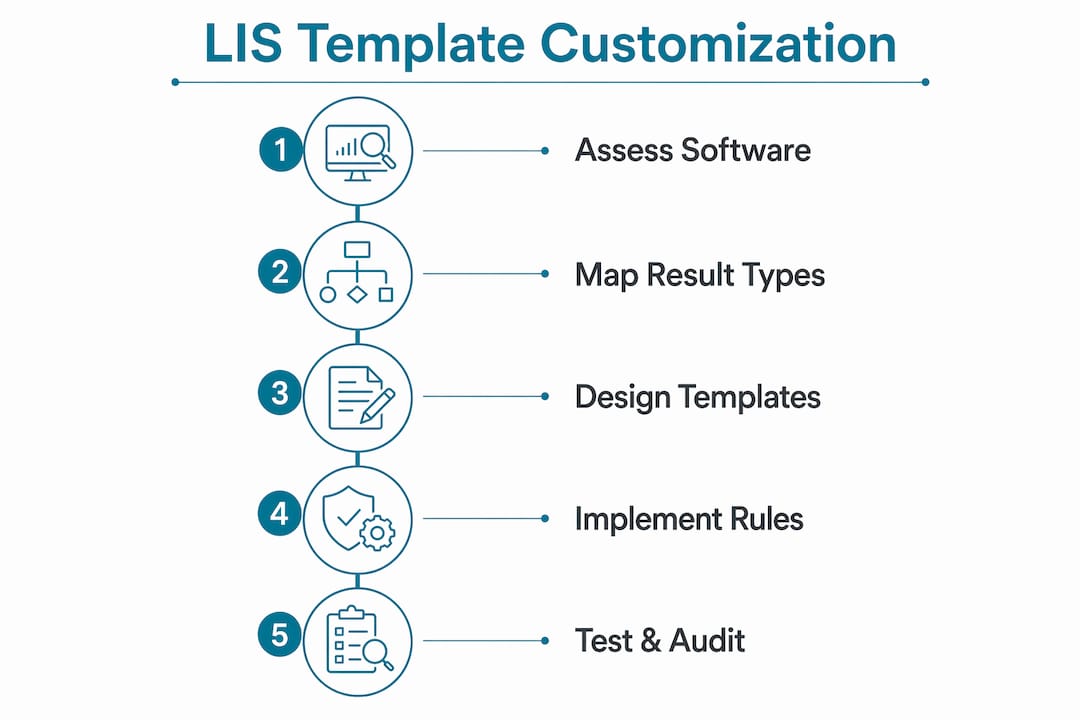
Effective template customization follows a defined lifecycle. Improvising at any stage introduces errors that are difficult to trace and expensive to fix after deployment.
-
Draft the template specification. Document the result categories the template will cover, the content rules that will fire for each category, the layout requirements, and the data fields that will populate automatically. This specification becomes the basis for validation testing.
-
Build the content rules in the LIS rule engine. Map each result classification to its template. Define the text blocks, interpretation language, and reference content that each rule will insert. Use your lab's approved clinical language, not placeholder text.
-
Configure the presentation layer separately. Apply layout settings including header structure, logo placement, font styles, and data grouping. Pre-set layout templates that can be saved and reused reduce formatting inconsistency across report types.
-
Test against representative cases. Run the template against real or de-identified cases covering every result category the template is designed to handle. Verify that rule logic fires correctly, that no fields are missing, and that the output matches the specification.
-
Conduct peer review and clinical sign-off. A second reviewer, typically a senior scientist or medical director, should review test outputs against the specification before deployment. Document this review formally.
-
Deploy with version tagging. Assign a version number to the deployed template and record the deployment date, approving personnel, and the change request that initiated the work. Change request traceability is the mechanism that allows you to reproduce any prior report output during an investigation or audit.
-
Archive the prior version. Do not delete superseded templates. Archive them with their version tag and deployment history intact.
The table below compares rule-based template customization against presentation-only editing, which is the most common mistake labs make when starting this process.
| Approach | Content consistency | Reviewer effort | Audit traceability | Scalability |
|---|---|---|---|---|
| Rule-based customization | High | Low | Full | Scales with result volume |
| Presentation-only editing | Low | High | Partial | Does not scale |
Pro Tip: Never deploy a template change directly to production without a staging environment test. Even minor rule edits can interact with existing logic in unexpected ways. A one-hour test cycle prevents a week of incident investigation.
How to troubleshoot and optimize LIS reporting templates for ongoing improvement
Templates degrade over time. Clinical guidelines update, new variant classifications emerge, and lab workflows change. A template that performed well at deployment will develop gaps within 12 to 18 months without active maintenance.
The most common troubleshooting scenarios in genetic and molecular labs include:
- Inconsistent interpretation text: Usually caused by a rule firing on a broader classification than intended. Audit the rule conditions and tighten the trigger criteria.
- Missing fields in output: Typically a data mapping issue where a new test type or result field was added to the LIS but not mapped to the template. Review field mappings after any LIS update.
- Template not firing for a result category: Check whether the result classification in the LIS exactly matches the trigger condition in the rule. Case sensitivity and whitespace errors are frequent culprits.
- Layout breaking on certain result types: Often caused by variable-length text blocks that overflow fixed layout containers. Build layout containers with flexible height settings.
- Supplemental or referral report mismatches: Mayo Clinic Laboratories supports ancillary PDFs and referral reporting workflows. When supplemental reports are involved, verify that the primary and supplemental templates share consistent terminology and formatting.
Optimization cycles should run on a defined schedule, not only when problems surface. Quarterly reviews of audit reports, reviewer feedback logs, and turnaround time data will surface patterns that individual incident reports miss. When a reviewer consistently edits the same section of a template, that is a signal that the rule logic needs refinement, not that the reviewer is being thorough.
Maintaining alignment with LOINC coding standards and CPIC guidelines during optimization cycles keeps templates compatible with external systems and current with clinical evidence. Assign a named owner for each template category so that guideline updates trigger a formal review rather than being noticed incidentally.
Pro Tip: Create a simple feedback form for report reviewers to flag template issues in real time. A structured log of reviewer edits is more actionable than periodic audits alone, and it builds a culture of continuous improvement without adding significant workload.
What advanced best practices ensure audit-ready LIS reporting template customization?
Audit readiness is not a state you achieve once. It is a property of your template management workflow that must be maintained continuously. Labs that treat audit preparation as a periodic exercise rather than an operational standard will always find gaps when an inspection arrives.
The lifecycle of every template change must be fully documented from the moment a change is requested to the moment the updated template is archived. Audit-ready lifecycle tracking includes request logging, approval records, testing documentation, deployment records, and archival of superseded versions. Each of these records must be linkable to a specific template version.
Key practices for maintaining audit-ready template customization include:
- Object history reports: Generate and retain reports that show every modification made to a template object, including who made the change and when.
- Checkout activity logs: Track which users accessed and edited templates during each change cycle. This is the primary evidence that change control procedures were followed.
- Change request to deployment linkage: Every deployed template version must trace back to a formal change request. Undocumented changes are a finding in any quality audit.
- Traceability for prior report reproduction: When a prior report is questioned, you must be able to identify which template version generated it and reproduce the output. This requires version-tagged archives, not just current templates.
- Integration with quality management systems: Template change records should feed into your lab's quality management system so that template issues can be tracked alongside other quality events.
"The ability to reproduce a prior report output is not just a compliance requirement. It is the foundation of clinical accountability in genetic testing."
Labs that integrate template lifecycle management with their broader quality management system move from reactive compliance to proactive governance. That shift reduces audit preparation time and, more importantly, reduces the risk of a report error going undetected.
Key takeaways
Effective LIS reporting template customization requires outcome-driven rule logic, structured lifecycle management, and continuous optimization to produce consistent, audit-ready genetic test reports.
| Point | Details |
|---|---|
| Two-layer design is non-negotiable | Rule-based content logic and presentation formatting must be built and maintained separately. |
| Outcome-driven categories reduce errors | Separate templates for P/LP, VUS, and negative results eliminate manual interpretation drafting. |
| Version control enables audit traceability | Every deployed template must link to a change request and retain an archived prior version. |
| Optimization requires scheduled reviews | Quarterly audits of reviewer edits and turnaround data surface template gaps before they become incidents. |
| Lifecycle documentation is a quality asset | Object history and checkout activity logs are the primary evidence of change control compliance. |
Why most labs are still getting template customization wrong
After working closely with genetic and molecular labs at various stages of maturity, the pattern I see most often is not a lack of technical skill. It is a structural misunderstanding of what template customization actually involves. Labs invest significant effort in making reports look professional, with clean layouts, branded headers, and well-formatted tables, while leaving the content logic entirely manual. The result is a report that looks authoritative but requires a reviewer to write the same interpretation paragraph 40 times a day.
The CanVIG-UK model is instructive precisely because it treats template categories as clinical decisions, not formatting choices. When a lab defines a discrete template for a BRCA1 pathogenic variant versus a VUS in the same gene, it is encoding clinical knowledge into the system. That encoded knowledge is what reduces reviewer workload and report variability simultaneously.
The audit-readiness piece is where I see the most consequential gaps. Labs often have version control in theory but not in practice. Templates get edited directly in production, change requests are informal, and archived versions are incomplete. When an inspection arrives or a prior report is questioned, the documentation trail falls apart. Building lifecycle management into the template workflow from the start is far less painful than retrofitting it after an audit finding.
My honest advice: treat your template library as a regulated document. Apply the same change control discipline you would to an SOP. The overhead is minimal compared to the risk of an undocumented template change affecting patient results.
— Tarek
How Labrynix supports advanced LIS template customization for genetic labs

Labrynix is built specifically for the template customization challenges genetic and molecular labs face every day. The Labrynix platform combines outcome-driven PGx reporting templates, AI-assisted interpretation summaries, CPIC guideline support, and PharmGKB-informed annotations with full audit trail tracking and role-based access controls. Labs can configure templates by result category, link content rules to interpretation outcomes, and maintain version-tagged archives without managing separate systems. Labrynix Reports keeps clinical review and final approval under laboratory control while eliminating the manual formatting work that slows high-volume genetic testing operations. If your lab is ready to move beyond disconnected templates and manual report drafting, Labrynix gives you the infrastructure to do it.
FAQ
What is LIS reporting template customization?
LIS reporting template customization is the process of configuring laboratory information system report formats and content rules to match specific genetic or molecular test result categories. It involves both deterministic rule logic for clinical content and separate presentation layer settings for layout and branding.
How many templates does a genetic testing lab typically need?
The number depends on the test menu, but labs should create at least one template per clinically distinct result category. CanVIG-UK's approach uses separate templates for pathogenic variants, VUS classifications, and negative results within the same gene panel.
What makes a LIS template audit-ready?
An audit-ready template has a complete change history linking every modification to a formal change request, approval record, and version tag. Audit-ready lifecycle tracking must include object history reports and checkout activity logs that can reproduce prior report outputs on demand.
What is the difference between rule-based and presentation-only template customization?
Rule-based customization uses deterministic logic to select and populate clinical content automatically based on result classification. Presentation-only customization controls layout and formatting but leaves content entry manual. Skipping rule-based logic increases reviewer effort and report variability even when the template looks polished.
How often should LIS report templates be reviewed and updated?
Templates should be reviewed at minimum quarterly, and immediately following any LIS update, clinical guideline revision, or new test type addition. Reviewer feedback logs and turnaround time data are the most reliable indicators that a template needs refinement.