
A LIMS reporting module is defined as the component of a Laboratory Information Management System that converts raw laboratory data into structured, controlled outputs including customizable reports, dashboards, and Certificates of Analysis (COAs). Unlike a simple print function, this module is the analytical and documentation layer of your LIMS, responsible for turning sample records, QC metadata, and workflow data into actionable operational insights. For laboratory managers evaluating what a LIMS reporting module delivers, the answer covers three distinct functions: report generation, compliance documentation, and real-time performance visibility. Understanding each function determines how much operational value your lab extracts from its data.
What is a LIMS reporting module and how does it work?
A LIMS reporting module is the part of a Laboratory Information Management System that converts lab data into structured outputs including customizable reports, dashboards, and COAs. This definition matters because many labs treat reporting as an afterthought, when it is actually the primary interface between laboratory operations and every external stakeholder, from accreditation bodies to clinical providers. The module sits on top of the LIMS data model and pulls from sample records, test results, user activity logs, and instrument data to generate controlled documents.
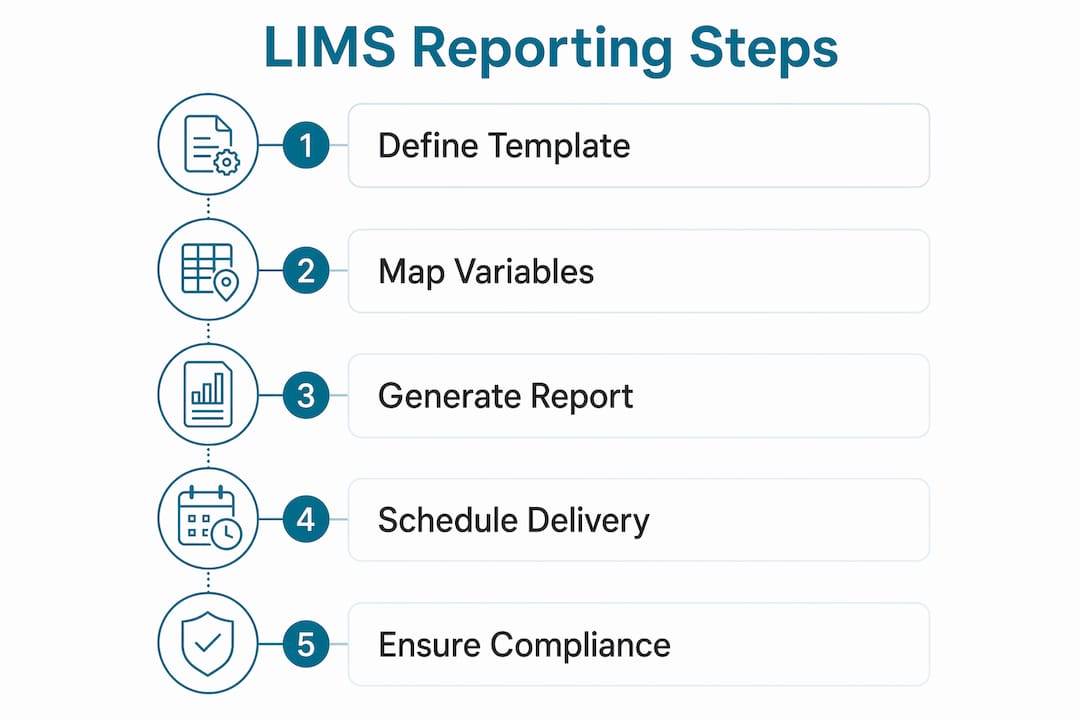
The configuration process follows a defined sequence that most platforms share. Administrators begin by creating report definitions or templates, which specify the data set, the rows and columns to display, and the aggregation method for each field. Aggregation choices include count, mean, percentage, or sum, and each choice directly affects what the output communicates. A poorly chosen aggregation silently distorts the numbers a lab manager sees on a dashboard, which is why this step requires deliberate review.

After defining the template structure, the next step is connecting report variables directly to the LIMS data model. Report definitions must connect to underlying sample records and QC metadata to maintain accuracy and auditability. Loose linkage between a report template and its data source is one of the most common causes of broken traceability during audits. Once variables are mapped, administrators preview the report output, validate the data against known records, and approve the template for production use.
The generation process itself can be manual or automated. Scheduled report generation and delivery features allow labs to push COAs, turnaround time summaries, or QC trend reports to recipients on a defined cadence without manual intervention. This removes a significant source of delay and human error from the reporting workflow.
Pro Tip: Before building any report template, confirm that every variable you plan to display maps to a specific field in your LIMS data model. If the field does not exist in the data model, the report will either error out or silently return blank values, both of which create audit risk.
Key capabilities and types of LIMS reporting module features
LIMS reporting modules vary considerably across platforms, but the most capable systems share a core set of features that address both operational and regulatory needs. Understanding these feature categories helps lab managers evaluate platforms against real workflow requirements rather than marketing claims.
Core feature categories include:
- Customizable report templates: Labs configure templates around specific KPIs, test panels, or client requirements. Reusable report configurations reduce repetitive manual effort and standardize outputs across projects and users. A pharmacogenomics lab, for example, can build a single PGx report template that auto-populates gene-drug interaction data for every patient result.
- Dashboards and real-time KPI tracking: Dashboards surface live metrics including sample throughput, pending result counts, turnaround time by test type, and rejection rates. The credibility of these dashboards depends entirely on properly configured aggregation and calculated fields in the underlying report definitions, not on the visual design layer.
- Audit trails and access control: Every data change is logged with the user identity, timestamp, original value, and new value. This creates the electronically controlled record that accreditation bodies require.
- Automated scheduling and branded delivery: Reports and COAs are generated and distributed on a schedule, with lab branding applied consistently across all outputs.
- Data visualization and statistical tools: Trend charts, Levey-Jennings plots for QC data, and statistical summaries give lab managers the analytical depth to detect performance shifts before they become compliance problems.
| Feature | Primary benefit |
|---|---|
| Customizable templates | Standardizes outputs and eliminates manual formatting |
| Real-time dashboards | Gives managers live visibility into throughput and quality |
| Audit trails | Supports ISO 17025 and regulatory traceability requirements |
| Automated scheduling | Removes manual delivery steps and reduces turnaround time |
| Statistical analysis tools | Enables trend detection and proactive quality management |
Pro Tip: When evaluating LIMS reporting features for a new lab setup, ask vendors to demonstrate how dashboard KPIs are calculated at the data model level, not just how they look on screen. A visually polished dashboard built on misconfigured aggregation is worse than no dashboard at all.
Why compliance and audit readiness rely on LIMS reporting modules
Compliance is not a feature you add to a reporting module. It is the outcome of how the module is configured and controlled from day one. Accreditation standards including ISO 17025 require laboratories to maintain complete traceability from sample receipt through final report delivery, and the reporting module is where that traceability either holds or breaks.
Audit trails record user identity, timestamp, and old and new values for every data change in the system, which is the minimum requirement for regulated laboratory environments. This means that when an auditor asks who changed a result value and why, the system must answer that question with a complete, unaltered record. Labs that rely on manual formatting or copy-paste workflows cannot provide this level of documentation, and manual report formatting can breach change control requirements, creating direct audit compliance risk.
The reporting module also enforces role-based access, which limits who can generate, approve, modify, or distribute reports. This access structure is not just a security feature. It is a compliance control that prevents unauthorized changes to finalized documents. For labs pursuing or maintaining ISO 17025 accreditation, role-based report access is a documented requirement, not a recommendation.
Labs that implement LIMS reporting modules with properly configured audit trails and access controls report measurable improvements in audit preparation time. LIMS reduces manual errors up to 80% and improves turnaround time by 25 to 40 percent, which means the compliance benefits extend directly into operational performance. Fewer errors in reports means fewer corrective actions, fewer audit findings, and faster accreditation renewals.
For labs building their LIMS compliance infrastructure from the ground up, the reporting module configuration should be treated as a compliance deliverable, not a software setup task.
How labs use LIMS reporting modules to improve operations
The operational impact of a well-configured reporting module extends well beyond compliance documentation. Lab managers who use reporting modules effectively describe a shift from reactive management to data-driven decision-making. That shift happens because the module makes performance data visible in real time rather than buried in spreadsheets or batch exports.
The most direct operational benefit is the elimination of manual report formatting. Labs that previously spent hours each week copying results into Word templates, applying formatting, and emailing PDFs can replace that entire workflow with a single automated process. Report template reuse is where the majority of reporting module ROI is realized, because the time savings compound across every report generated from that template.
Additional operational improvements include:
- Standardized documentation across projects and time periods: Every report generated from the same template looks identical, which matters when clients or providers compare results across multiple testing cycles.
- Faster turnaround on COAs and client reports: Automated generation triggered by result approval removes the manual handoff step that typically adds hours or days to report delivery.
- Trend analysis for quality management: Lab managers can track QC failure rates, instrument drift, and analyst performance over time using the same reporting infrastructure that generates client-facing documents.
- Integration with instruments and enterprise systems: Reporting modules that connect to instrument data feeds, EHR platforms, or billing systems via HL7 or FHIR eliminate manual data entry between systems and reduce transcription errors.
For labs migrating from spreadsheets to LIMS, the reporting module is often the most immediately visible improvement. The ability to generate a formatted, branded, audit-ready COA in seconds rather than minutes changes how the entire lab team thinks about documentation.
Key Takeaways
A LIMS reporting module is the layer that transforms laboratory data into controlled, audit-ready documents and operational insights, making it the most compliance-critical and operationally valuable component of any LIMS platform.
| Point | Details |
|---|---|
| Core definition | A LIMS reporting module converts raw lab data into reports, dashboards, and COAs. |
| Configuration accuracy | Report templates must connect directly to the LIMS data model to maintain traceability. |
| Compliance dependency | Audit trails, role-based access, and controlled records are required for ISO 17025 readiness. |
| Operational ROI | Reusable templates reduce manual effort and standardize outputs across all lab projects. |
| Automation impact | Scheduled report generation removes manual delivery steps and reduces turnaround time by 25 to 40 percent. |
Why most labs underestimate the reporting module until it's too late
I have worked with laboratory teams that spent months selecting a LIMS based on sample tracking features and workflow queues, then discovered six months into implementation that the reporting module could not produce the COA format their accreditation body required. That is a painful and avoidable situation.
The reporting module is not a peripheral feature. It is the output layer of everything your lab does, and its configuration complexity is consistently underestimated. The most common mistake I see is building report templates that look correct on screen but are disconnected from the actual data model. The report generates without errors, the numbers appear plausible, and nobody catches the problem until an auditor asks for a traceability chain and the system cannot produce one.
My honest advice for any lab selecting or upgrading a reporting module is to start with your compliance requirements, not your visual preferences. Define what your audit trail must capture, what your COA must contain, and what your accreditation body will ask to see. Then configure your templates to meet those requirements first. The branded header and color scheme can come later.
The future of LIMS reporting is moving toward AI-assisted report drafting and automated anomaly detection in QC data. Platforms like Labrynix are already building AI-powered insights directly into the reporting workflow, which means the gap between labs using modern reporting infrastructure and those still on manual templates will widen significantly over the next few years. The labs that invest in proper reporting module configuration today will be the ones that scale without rebuilding from scratch.
— Tarek
See how Labrynix handles LIMS reporting for molecular labs
Labrynix was built specifically for genetic testing, pharmacogenomics, and molecular diagnostic laboratories that need more than a generic reporting module. The platform combines LIMS workflow management with advanced PGx report generation, AI-assisted summaries, CPIC guideline support, PharmGKB-informed annotations, and branded report delivery in one connected system.
Labrynix Reports generates professional, provider-friendly pharmacogenomics reports using customizable templates while keeping clinical review and final approval under laboratory control. Labrynix Intelligence adds AI-powered workflow automation and operational analytics to support bottleneck detection and review queue management. For labs building their LIMS reporting setup from launch, Labrynix provides the infrastructure to manage sensitive genetic data with HIPAA-conscious workflows, role-based access, and audit logs built in. Explore the full platform at Labrynix.
FAQ
What is a LIMS reporting module?
A LIMS reporting module is the component of a Laboratory Information Management System that converts laboratory data into structured outputs including customizable reports, dashboards, and Certificates of Analysis. It serves as the primary documentation and analytics layer of the LIMS platform.
What types of reports can a LIMS reporting module generate?
LIMS reporting modules generate Certificates of Analysis, QC trend reports, turnaround time summaries, audit trail exports, management dashboards, and client-facing result documents. The specific output types depend on how report templates are configured against the LIMS data model.
How does a LIMS reporting module support ISO 17025 compliance?
The module maintains audit trails that record every data change with user identity, timestamp, and original and new values, which is a direct requirement for ISO 17025 accreditation. Role-based access controls further restrict who can generate, modify, or approve finalized reports.
What is the difference between a report template and a report definition?
A report definition specifies the data set, rows, columns, aggregation methods, and variable mappings that determine what a report contains. A report template applies that definition to a formatted output with branding, layout, and delivery rules applied.
How does automated report generation work in a LIMS?
Automated report generation uses scheduled triggers or workflow events, such as result approval, to generate and distribute reports without manual steps. This removes the manual handoff between result entry and report delivery, reducing turnaround time and eliminating formatting errors.