
Web-based lab reports are test results delivered through a browser or secure portal rather than emailed as static file attachments. The report lives at a URL, renders as an HTML page or interactive view, and can generate a downloadable PDF artifact on demand. For lab teams evaluating modern electronic lab reporting systems, three decisions matter most:
- Go web-first for consumption. Providers and patients get faster access, better mobile readability, and richer content than a flat PDF allows.
- Keep auditable PDF artifacts. Signed, timestamped PDFs remain the standard for regulatory records, legal hold, and archival.
- Require HL7, FHIR, or REST API connectivity. Without integration into your EHR, EMR, or LIMS, a reporting module is just a design tool.
The checklist in the vendor evaluation section maps these three priorities to specific questions you should ask before signing any contract.
Key Takeaways
Web-based lab reports deliver results faster and more accessibly than static PDFs, but the strongest implementations pair web delivery with auditable PDF artifacts for compliance.
| Point | Details |
|---|---|
| Go web-first for delivery | HTML portal delivery improves provider and patient access, mobile readability, and report engagement. |
| Keep signed PDFs for records | Template-generated, timestamped PDFs remain the standard for regulatory artifacts and legal hold. |
| Require HL7/FHIR integration | Without EHR/EMR connectivity, a reporting module cannot replace your existing workflow. |
| Run a sandbox pilot first | Validate templates and integrations with your own de-identified data before any go-live commitment. |
| Labrynix for genetic and PGx labs | Labrynix combines branded PGx report templates, HL7/FHIR integration, audit logs, and secure portals in one platform built for molecular and genetic labs. |
Table of Contents
- What web-based lab reports are and why labs adopt them
- Core features every web-based lab reporting system must have
- How to choose between webpage, PDF, and hybrid delivery
- How to implement web-based reporting: integrations, migration, and testing
- Which labs and report types benefit most from web-based reporting
- Security and compliance basics US labs must check
- How to evaluate vendors: the checklist and questions that matter
- How Labrynix maps to these requirements
- User training and change management for a successful rollout
- The case for web-first reporting is stronger than most labs realize
- Labrynix is built for labs that are ready to move past static PDFs
- Sources
What web-based lab reports are and why labs adopt them
A web-based lab report is generated from a template engine, published to a secure URL or portal, and rendered in the browser. The underlying data comes from your LIMS or LIS; the template controls layout, branding, conditional content blocks, and audience-specific language. The result is a living document: you can push an amended interpretation without re-emailing a new PDF to every recipient.
The operational benefits are concrete:
- Faster turnaround. Results publish the moment the approval workflow completes, with no manual attachment step.
- Fewer transcription errors. Data flows from the instrument or LIMS directly into the template rather than being re-keyed.
- Better provider and patient access. A portal link opens on any device; a PDF attachment requires a compatible reader and often a download.
- Easier corrections. An amended report updates at the same URL; audit logs capture every version.
- Measurable engagement. Interactive web reports increase the time users spend with content and allow embedded features such as guideline pop-ups, video explainers, and AI-assisted navigation, which a static PDF cannot carry.
PDF still wins in specific situations: regulatory submissions requiring a signed artifact, legal hold scenarios, and any workflow where the recipient's system ingests a file rather than a URL. The practical answer for most labs is not PDF or web, but PDF and web, with each format doing the job it does best.
Core features every web-based lab reporting system must have
A production-grade system needs more than a template editor. Before you evaluate any online lab report software, confirm it covers every layer below.
Security and compliance controls
- Role-based access with configurable permissions per user type (lab director, technologist, provider, patient)
- Audit logs capturing every view, edit, approval, and distribution event with timestamps and user IDs
- Encryption in transit (TLS 1.2 or higher) and at rest
- Configurable data retention and legal hold policies
Interoperability
- HL7 v2 and FHIR R4 message support for order intake and result delivery
- REST APIs and webhooks for custom integrations
- Certified connectors or documented integration patterns for major EHR and EMR platforms
- Instrument and LIS data ingestion
Template engine
- Branded report template customization with logo, color palette, and typography controls
- Conditional rendering: show or hide content blocks based on result values, test type, or recipient role
- Multi-variant templates for provider, patient, and payer audiences from a single data source
- Template versioning so you can track which template version generated each historical report
Delivery options
- HTML portal view with secure, authenticated URL
- On-demand or auto-generated downloadable PDF with optional digital signature and timestamp
- Email and SMS notification with portal link (not attachment)
- Batch distribution for reference lab volumes
Automation and workflow
- Review and approval queues with configurable sign-off roles
- Scheduled distribution jobs and exception handling for failed deliveries
- Automated amendment workflows with version tracking
Operational readiness
- Sandbox or testing environment for template validation before go-live
- WCAG 2.1 AA accessibility compliance in rendered output
- A diagnostic reporting workflow that connects order intake through final delivery
A pathology lab web app built on Firebase and Vercel generated over 4,000 reports in six months using multi-user authentication, caching, and no-install browser access, which illustrates that these feature sets are achievable at production scale without custom infrastructure.
Pro Tip: Before signing a contract, ask the vendor to run a full end-to-end test in their sandbox using a de-identified sample dataset from your actual test menu. Template rendering errors and integration gaps surface in sandbox that never appear in a polished demo.
How to choose between webpage, PDF, and hybrid delivery
The format decision is really an audience and purpose decision. Massachusetts guidance recommends webpages over PDFs for accessibility and manageability, noting that HTML content adapts to devices and is far easier to keep accessible than a PDF. The Title II ADA accessibility compliance deadline in 2026 applies to government digital content and is a useful benchmark for any lab serving public health programs.
A hybrid approach resolves most of the tension: use the web view for interactive consumption and generate a template-based PDF for the formal, auditable record. The PDF becomes the artifact of legal standing; the web view is what providers and patients actually read.
There is also a sustainability argument. Hosting a report as a lightweight webpage can reduce distribution carbon footprint by roughly 99% compared with emailing large PDF attachments to 1,000 recipients and storing those files over five years. For high-volume reference labs, that is a measurable operational difference.
| Dimension | HTML/Webpage | Hybrid | |
|---|---|---|---|
| Mobile readability | Excellent | Poor without optimization | Excellent (web view) |
| Accessibility (WCAG) | Easier to maintain | Requires separate remediation | Web view handles it |
| Archival and legal standing | Requires snapshot/versioning | Strong; signed artifacts | PDF covers this layer |
| Updateability | Instant at same URL | Requires new file and redistribution | Web updates; PDF is point-in-time |
| Distribution carbon footprint | Very low | High for large attachments | Low (link-based delivery) |
For genetic and PGx reports specifically, the hybrid pattern is the right default. The web view carries the annotated guideline content, interactive drug tables, and patient-friendly summaries. The signed PDF goes into the medical record.
How to implement web-based reporting: integrations, migration, and testing
Implementation breaks into five phases. Skipping any of them is where projects stall.
- Discovery. Map your current test menu, report types, recipient audiences, and existing integration points. Identify which EHR, EMR, billing, and instrument systems need to connect.
- Template design. Build and validate templates in the vendor's sandbox. Use de-identified real data, not synthetic data, to catch edge cases in conditional rendering.
- Integration and data mapping. Configure HL7 or FHIR message flows, map LIMS fields to template variables, and connect delivery channels. Open-source implementations show common patterns: server-side generation for sensitive data, client-side caching for speed, and PDF export via signed server calls rather than browser-side rendering. For genetic data, server-side generation with hardened audit logs is the safer architecture.
- Validation and parallel run. Run the new system alongside your existing process for a defined period. Reconcile every report output against the legacy system before cutover.
- Go-live and post-launch support. Define escalation paths, monitor delivery logs daily for the first two weeks, and schedule a 30-day review.
Integration checklist before go-live:
- EHR/EMR order intake and result delivery confirmed
- Instrument and LIS data feeds tested with real result ranges
- Billing system handoff validated
- Provider portal authentication tested with actual provider accounts
- Patient portal access tested across mobile and desktop browsers
- SSO or identity provider integration confirmed
Timeline varies by lab size. A focused reporting-only deployment for a startup lab can reach go-live in six to ten weeks. A mid-size molecular lab adding LIMS integration typically runs twelve to twenty weeks. An enterprise reference lab with multi-site EHR connections and custom template libraries should plan for six months or more, including validation and staff training.
Which labs and report types benefit most from web-based reporting
Not every lab type needs the same delivery pattern. Here is how the use cases break down:
- PGx and genetic testing labs. Long, annotation-heavy reports with CPIC guideline tables, drug interaction summaries, and patient-friendly interpretation sections. Web-first delivery lets providers navigate to the relevant drug class without scrolling through a 20-page PDF. Signed PDFs go into the EHR. Genetic testing lab software built for this workflow handles multi-audience templates natively.
- Molecular diagnostics labs. Fast turnaround is the priority. Web delivery cuts the time between result sign-off and provider notification to minutes. Structured numeric panels render cleanly in HTML and export to PDF for the medical record.
- Reference labs. Batch distribution to hundreds of ordering providers. Portal links replace email attachments; delivery logs confirm receipt. Branded report templates maintain consistent identity across a high-volume, multi-client operation.
- Hospital labs. EMR integration is the primary requirement. Web-based reporting connects directly to the EHR result feed; the portal view gives clinicians a richer view than the EMR's native display. Molecular diagnostics LIMS solutions built for hospital environments handle this integration layer.
Pro Tip: For PGx labs, build separate template variants for the ordering provider, the patient, and the pharmacist from day one. Retrofitting audience-specific content into a single-template design after go-live is significantly more expensive than building the variant structure upfront.
Security and compliance basics US labs must check
HIPAA-conscious controls are table stakes, not differentiators. Every system you evaluate should demonstrate all of the following before you reach the pricing conversation.
- Encryption: TLS in transit, AES-256 or equivalent at rest.
- Business Associate Agreement (BAA): Required before any PHI touches the vendor's infrastructure.
- Role-based access control: Granular permissions per user role, not just admin/user binary.
- Audit logs: Immutable, timestamped records of every access, edit, approval, and delivery event. Logs must be exportable for regulatory review.
- Retention policies: Configurable retention periods with legal hold capability.
- Incident response: Documented breach notification process and SLA.
On accessibility, webpages are generally easier to make accessible than PDFs. The April 24, 2026 Title II ADA deadline is a practical forcing function: if your lab serves any government-funded program, your digital content must meet WCAG 2.1 AA standards.
Trust signals to request in your RFP:
| Signal | What to ask for |
|---|---|
| SOC 2 Type II | Current report or attestation letter |
| Penetration testing | Most recent third-party pen test summary |
| Audit log demo | Live demonstration of log export and search |
| Signed PDF capability | Sample report with digital signature and timestamp |
| Sandbox access | Dedicated test environment with your own data |
| BAA | Willingness to sign before any data sharing |
How to evaluate vendors: the checklist and questions that matter
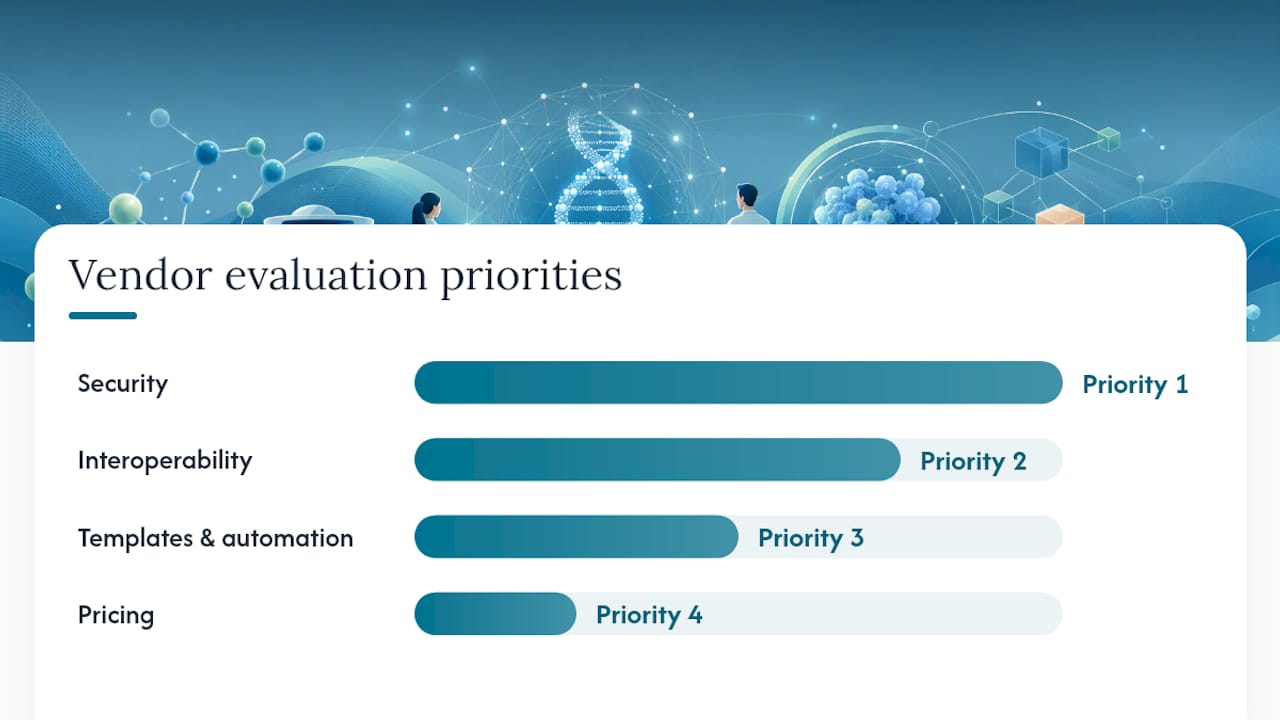
Prioritize your evaluation in this order: security first, then interoperability, then templates and automation, then pricing.
Prioritized checklist:
- Signed BAA and documented HIPAA controls
- HL7 v2 and FHIR R4 support with evidence of live deployments
- Role-based access and immutable audit logs
- Branded template engine with conditional rendering and versioning
- Automated approval and distribution workflows
- Sandbox or testing environment available before contract
- Documented SLA for uptime and support response
- Transparent pricing model (subscription vs. per-report, implementation fees, template fees)
Questions to ask every vendor:
- Which HL7 message types and FHIR resources do you support, and can you show a live integration with our EHR?
- What does your sandbox environment include, and can we load our own de-identified test data?
- How are audit logs stored, and can we export them in a format our compliance team can review?
- What is your process for template versioning and rollback if a template error reaches production?
- Can you provide references from labs running a similar test menu and volume?
- What are the implementation fees, and what is included in the base subscription?
Red flags: A vendor who cannot demonstrate audit logs in a live environment, has no sandbox offering, gives vague answers on data residency, or cannot name a reference customer in your lab category deserves extra scrutiny before you proceed.
Cost models vary. Most cloud-based lab management platforms charge a base subscription plus per-module fees, with implementation and template customization billed separately. Per-report pricing can look attractive at low volumes but becomes expensive at reference lab scale. Get a total cost of ownership estimate for your projected three-year volume before comparing headline prices.
How Labrynix maps to these requirements
Labrynix was built from real genetic and molecular laboratory experience, which shows up in specific product decisions rather than marketing language. The platform covers every layer of the checklist above within a single connected system.

Labrynix Reports generates branded, multi-audience PGx and genetic testing reports from customizable templates with conditional rendering, AI-assisted summaries, CPIC guideline support, PharmGKB-informed annotations, and FDA pharmacogenomic labeling references. Provider and patient variants are built into the template architecture from the start, not bolted on later.
Labrynix Connect handles HL7, FHIR, REST APIs, webhooks, and integrations with EHR, EMR, billing, and instrument systems. Labrynix LIMS manages the full sample-to-report workflow including order intake, accessioning, review queues, and approval routing. Role-based access, immutable audit logs, configurable permissions, and HIPAA-conscious data governance are built into the platform, not optional add-ons.
For a molecular or PGx lab deploying Labrynix, a typical configuration includes:
- Custom branded report templates for provider and patient audiences
- HL7 order intake from the ordering EHR and result delivery back to the same system
- Automated approval queue routing to the lab director for sign-off
- Secure portal access for providers and patients with role-specific views
- Audit log export capability for compliance review
Labrynix gives labs a sandbox environment, custom template builds, compliance documentation, and a demo process designed around your specific test menu, not a generic product walkthrough. Labs evaluating the platform can request a sandbox before committing to any contract.
User training and change management for a successful rollout
The technology rarely fails. The rollout fails when staff are not ready for it.
Start training before go-live, not after. Lab directors and compliance leads need to understand audit log access and retention settings. Technologists need hands-on time with the approval queue and amendment workflow. Providers using the portal need a short orientation, ideally a recorded walkthrough they can reference later.
Change management for a reporting system has one specific risk that generic software rollouts do not: clinicians and lab staff have strong habits around how results look and where they find them. A new portal or a redesigned report layout can generate resistance even when the underlying data is identical. Involve two or three high-volume ordering providers in template review before go-live. Their feedback on layout and navigation catches usability issues that internal teams miss, and their buy-in accelerates adoption across the provider network.
For lab staff, a parallel run period serves double duty: it validates the system and it builds confidence. Staff who have seen the new system produce correct results alongside the old one are far less likely to revert to manual workarounds after cutover. Document the parallel run results formally; that documentation also supports your validation record.
Post-launch, schedule a structured 30-day review with the lab director, IT lead, and at least one provider representative. Review delivery logs, amendment rates, and any support tickets. Most adoption issues surface in the first 30 days and are straightforward to fix if you are looking for them.
The case for web-first reporting is stronger than most labs realize
Most lab teams I talk with underestimate how much of their reporting friction is format-driven rather than data-driven. The results are accurate. The workflow is sound. But the report is a 12-page PDF that a provider opens on a phone, scrolls past three pages of methodology, and closes before reaching the clinical interpretation.
Web-first delivery with a hybrid PDF artifact is not a technology preference. It is an operational decision that affects how quickly providers act on results, how often patients actually read their own reports, and how much time your team spends fielding calls about results that were delivered but not understood. The labs that have made this shift report fewer provider calls, faster acknowledgment of critical results, and measurably better patient engagement with genetic and PGx reports specifically.
The compliance argument for keeping PDFs is real and should not be dismissed. But it is an argument for generating PDFs as artifacts, not for making PDFs the primary delivery channel. Those are different decisions, and conflating them is what keeps labs on outdated systems longer than they need to be.
If you are evaluating vendors, request a sandbox. Run your own test data through it. The difference between a system that was designed for genetic and molecular labs and one that was adapted from a generic reporting tool becomes obvious within an hour of hands-on use.
Labrynix is built for labs that are ready to move past static PDFs
Labs that have outgrown disconnected templates and manual PDF distribution need a system designed for the full sample-to-report workflow, not a reporting module grafted onto a generic platform. Labrynix delivers exactly that: branded, multi-audience report generation, HL7/FHIR integration, automated approval workflows, secure provider and patient portals, and HIPAA-conscious audit controls, all in one connected platform built specifically for genetic, molecular, and PGx labs.

The demo process is built around your test menu. You can request sandbox access, review template customization options, and see HL7 and FHIR integration in a live environment before any commitment. Pricing is custom-quoted based on lab size, reporting volume, and the modules you need. To see the platform in action and get a quote tailored to your lab, request a demo through the Labrynix solutions page.
Sources
- Mass
- Report Templates vs Dashboards: When PDF Reporting Wins | Blog | CxReports
- Madeby
- Interactive vs static annual reports: the wrong question? — Andrew Pegler Media
- Lab Genie — GitHub repository
- lab-report-management-system — GitHub
This article is general information, not a substitute for advice from a qualified doctor. Consult a qualified healthcare professional about your own circumstances before acting on anything here.