
Yes, lab portals can and should use SSO. The two protocols that matter are SAML 2.0 and OpenID Connect (OIDC), and the identity providers doing most of the heavy lifting in laboratory environments are Microsoft Entra ID (formerly Azure Active Directory) and Okta. If your lab already runs on-premises Active Directory, Entra ID is usually the path of least resistance. If you're building cloud-native portal access with modern API integrations, OIDC through Okta or Entra tends to fit better.
Here's the scope of what you need to know to actually get this running:
- Protocol choice: SAML 2.0 for legacy or enterprise-heavy environments, OIDC/OAuth 2.0 for modern, API-friendly workflows.
- Identity provider selection: Microsoft Entra ID, Okta, or an ADFS/custom IdP, depending on your existing directory infrastructure.
- Provisioning decision: authentication-only SSO versus SCIM or Just-in-Time (JIT) provisioning for automatic account lifecycle management.
- Mapping work: attribute and group claims need to map cleanly to portal roles and permissions before go-live.
- Testing discipline: a pilot phase catches certificate mismatches, clock skew, and missing claims before they hit production.
The operational payoff is straightforward. Centralizing authentication through a single identity provider means when someone leaves the lab, disabling their institutional account revokes access to every connected portal at once, instead of you chasing down five separate logins.
Key Takeaways
Lab portals achieve secure, efficient access through SAML or OIDC single sign-on paired with clear attribute mapping, deliberate provisioning choices, and disciplined pilot testing before rollout.
| Point | Details |
|---|---|
| Pick the right protocol | Use SAML 2.0 for legacy or attribute-heavy systems, OIDC for modern API-friendly portals. |
| Choose your IdP based on infrastructure | Entra ID fits labs already on Microsoft or on-prem AD; Okta suits a mixed cloud stack. |
| Decide provisioning strategy early | JIT or SCIM provisioning cuts onboarding overhead for labs with frequent staff turnover. |
| Map groups to roles before launch | Build a group-to-role table with explicit fallback rules for missing or overlapping claims. |
| Test thoroughly, then roll out in phases | Run a pilot group through the full test checklist before expanding to the full lab staff. |
| Labrynix builds SSO in from the start | Labrynix supports SAML and OIDC with attribute mapping and audit logging built into the LIMS and portal platform. |
Table of Contents
- How Does SSO Integrate a Lab Portal With an Identity Provider?
- Which SSO Protocols and Identity Providers Do Lab Portals Support?
- How Do You Register a Lab Portal in Microsoft Entra ID?
- How Do You Configure a SAML Integration in Okta?
- Should You Use Authentication-Only SSO or Full Provisioning?
- How Do You Map IdP Groups to Portal Roles?
- What Security and Compliance Controls Does Lab SSO Need?
- What's the Testing Checklist Before Going Live?
- How Long Does a Lab SSO Rollout Take?
- What Operational Benefits Does SSO Deliver for Lab Administrators?
- Practical Notes From Implementing SSO in Lab Environments
- How Does Labrynix Support SSO for Lab Portals?
- Where to Read the Original Documentation
- Frequently Asked Questions
- Sources
How Does SSO Integrate a Lab Portal With an Identity Provider?
Single sign-on works by shifting the job of verifying identity away from your lab portal and over to a dedicated identity provider. Your portal, in this arrangement, becomes what's called the Service Provider (SP). It trusts the IdP's word on who a user is, instead of managing its own password database.
The flow looks like this in practice:
- A user hits your lab portal's login page and clicks "Sign in with SSO."
- The portal redirects the browser to the identity provider (Entra ID, Okta, or your ADFS instance).
- The user authenticates at the IdP, often backed by multi-factor authentication.
- The IdP sends back a signed assertion (SAML) or an ID token (OIDC) containing the user's identity and attributes.
- The portal validates that assertion or token, checks the signature and expiration, then creates a session.
- Logout, when configured correctly, can trigger Single Logout (SLO) so the session ends at both the portal and the IdP simultaneously.
The critical distinction most teams miss early on is that authentication and provisioning are two separate jobs. Authentication answers "who is this person?" Provisioning answers "does this person have an account, and what can they access?" You can run SSO purely for authentication against existing portal accounts, or you can let the IdP push account creation and group membership automatically. Attributes and group memberships travel inside the assertion or token itself, which is what makes role mapping possible on the portal side without a second lookup.
Which SSO Protocols and Identity Providers Do Lab Portals Support?
Most lab portals built in the last several years support both SAML 2.0 and OpenID Connect, but the two protocols solve slightly different problems. SAML and OIDC are the two dominant standards for federated identity, and picking between them usually comes down to your existing infrastructure rather than a feature comparison.
SAML 2.0 is XML-based and has been the enterprise default for over a decade. It carries rich attribute data well, which matters when your portal needs group memberships, department codes, or clinical role designators passed at login. Older enterprise applications and many hospital-affiliated systems still expect SAML because that's what their identity infrastructure was built around.
OpenID Connect, built on top of OAuth 2.0, is the newer, lighter-weight option. It uses JSON web tokens instead of XML, integrates more naturally with mobile apps and REST APIs, and tends to be the preferred choice when you're connecting a portal to a broader ecosystem of modern cloud services.
The identity providers you'll encounter most often in laboratory settings:
- Microsoft Entra ID (Azure AD): the default if your lab or parent health system already runs on Microsoft 365 or on-prem Active Directory.
- Okta: common in labs that run a heterogeneous stack of cloud applications and want a dedicated identity layer separate from Microsoft's ecosystem.
- ADFS or a custom IdP: still present in larger hospital networks or legacy government-affiliated labs that haven't migrated to a cloud IdP.
- Google Workspace: occasionally relevant for smaller research labs or academic-affiliated programs already standardized on Google's directory.
If your lab has an existing enterprise directory, don't fight it. Extend it. A lab running on-prem AD with Azure AD Connect syncing to Entra ID gets SSO almost for free, since the identity infrastructure is already there.
Pro Tip: Attribute mapping and metadata handling differ meaningfully between IdPs. SAML metadata files are XML and need periodic re-import when certificates rotate; OIDC relies on a discovery endpoint that updates automatically. If your portal vendor only tests one flow deeply, ask which one before you commit.
How Do You Register a Lab Portal in Microsoft Entra ID?
Setting up Entra ID as your identity provider follows a predictable sequence, and most of it can be done by an IT admin without deep identity engineering background.
- Sign in to the Entra admin center and create a new App Registration for the lab portal.
- Configure the redirect URI (for OIDC) or the Assertion Consumer Service (ACS) URL (for SAML) — this must match exactly what your portal vendor specifies, including trailing slashes.
- Choose the protocol: set up a SAML-based enterprise application, or configure an OIDC app registration with the appropriate client ID and secret.
- Upload or link the portal's SP metadata if your vendor requires it, or manually enter the Entity ID and ACS URL.
- Grant the Read Directory Data API permission if the portal needs to look up user or group details beyond what's in the token.
- Assign users or groups to the application under Enterprise Applications so only the right staff can authenticate.
- Record the app ID, tenant ID, and metadata endpoint URLs for your portal's configuration screen.
A Global Administrator role is typically required to grant the directory read permission and consent to the app registration, so loop in whoever holds that role early. If your lab syncs on-premises Active Directory accounts to the cloud, Azure AD Connect handles that synchronization, meaning staff can keep using their existing domain credentials while the portal authenticates against Entra ID in the cloud.
Attribute mapping is where most first attempts stumble. Here's a mapping template that works for the majority of lab portal setups:
| Entra ID / SAML Claim | Portal Field | Notes |
|---|---|---|
email or mail | Email address | Primary identifier for account matching |
displayName | Full name | Shown in the portal UI and audit logs |
userPrincipalName | Username / login ID | Must match domain suffix configured in Entra |
groups | Role / permission group | Requires group claims enabled in the app registration |
department (optional) | Lab site or division | Useful for multi-location lab networks |
If your lab uses custom domains, verify the domain in Entra ID first so user principal names resolve to the correct email suffix. Mismatched suffixes are a common source of failed logins that look like a permissions problem but are actually a domain configuration issue.
How Do You Configure a SAML Integration in Okta?
Okta's SAML setup wizard is more guided than Entra's, but the underlying concepts are identical: you're establishing trust between the portal (SP) and Okta (IdP) through shared metadata and matching URLs.
- In the Okta admin console, create a new SAML 2.0 application and name it something identifiable, like "Lab Portal Production."
- Set the Single Sign-On URL (this is the ACS URL your portal vendor provides) and mark the checkbox for "Use this for Recipient URL and Destination URL" unless your portal specifies otherwise.
- Enter the Audience URI (SP Entity ID) exactly as your portal requires. This value is case-sensitive and a frequent source of "invalid audience" errors.
- Configure attribute statements, mapping Okta user profile fields to the claims your portal expects.
- Add group attribute statements if the portal uses group-based role assignment, filtering by group name pattern.
- Save the application and download the IdP metadata (or copy the metadata URL) to paste into your portal's SSO configuration screen.
- Assign a small set of test users or groups to the Okta app before rolling it out broadly.
- Run a test sign-on using Okta's built-in preview feature, then verify the assertion in your portal's login logs.
| Okta SAML Attribute | Portal Field | Notes |
|---|---|---|
user.email | Email address | Standard Okta profile attribute |
user.firstName + user.lastName | Full name | Concatenate or map separately depending on portal schema |
user.login | Username | Often mirrors email in Okta by default |
groups (filtered) | Role / permission group | Filter by starts-with or regex to limit which groups sync |
A few practical checklist items before you flip the switch: confirm the Single Sign-On URL uses HTTPS and matches your production environment exactly, double-check the Issuer value against what your portal expects, and put a certificate rotation reminder on the calendar. Okta certificates typically have a multi-year validity window, but when they expire, authentication fails silently until someone notices.
Should You Use Authentication-Only SSO or Full Provisioning?
This decision shapes how much ongoing admin work your team does after launch, and it's worth getting right before you build anything.
Authentication-only SSO means the portal still maintains its own user accounts, but instead of a password, login is handled by redirecting to the IdP. The portal checks whether an account already exists matching the authenticated identity, and if not, access is denied. This pattern shows up frequently in SAML-based authentication-only workflows where account creation stays a deliberate, manual step.
Provisioning, by contrast, hands account lifecycle management to the identity layer. This comes in two flavors:
- SCIM (System for Cross-domain Identity Management) actively pushes account creation, updates, and deactivation from the IdP to the portal on a schedule or trigger.
- Just-in-Time (JIT) provisioning creates the account automatically the first time a user logs in, using the attributes in that first SAML assertion or OIDC token.
For labs with steady, small staff rosters, authentication-only is often simpler and gives IT more manual control over exactly who gets an account. But once you're dealing with rotating research staff, seasonal interns, or a multi-site lab network with regular turnover, manual account creation becomes a bottleneck fast.
JIT provisioning in particular reduces onboarding overhead significantly because a new hire's portal account exists the moment they authenticate for the first time, with role and department already populated from directory attributes. Deprovisioning works the same way in reverse: disable the account at the IdP, and the next login attempt simply fails.
Pro Tip: If your lab has research rotations, postdoc turnover, or student staff on academic calendars, JIT provisioning alone can eliminate the recurring "please create an account" ticket that clogs helpdesk queues every semester.
How Do You Map IdP Groups to Portal Roles?
Once authentication works, the next problem is authorization: making sure the right people land in the right role once they're inside the portal. Three approaches cover most lab scenarios.
Group-based mapping assigns portal roles based on which security groups a user belongs to in the IdP. This is the most common pattern because most labs already organize staff into groups for other purposes (email distribution, file share access, and so on).
Claim-based role assignment reads a specific attribute, like a job title or department code, and maps it directly to a role without relying on group membership at all.
Fallback rules matter more than people expect. What happens when a user authenticates successfully but carries no recognized group claim? The safe default is to assign the most restrictive role available, or block portal access outright and flag the account for manual review, rather than defaulting to broad access.
Here's a sample mapping using generic group labels that most labs can adapt directly:
| IdP Group | Portal Role | Permission Summary |
|---|---|---|
| lab-admins | Lab Administrator | Full access to accessioning, reporting, and user management |
| lab-technicians | Technician | Sample processing and workflow queue access, no admin settings |
| lab-viewers | Read-Only Viewer | View reports and sample status, no edit permissions |
| project-readers | External Collaborator | Limited view of specific project or study results only |
| billing-staff | Billing Coordinator | Access to invoice and claim status, no clinical data |
Overlapping group membership is the edge case that trips up most implementations. If a user sits in both lab-viewers and lab-admins, your mapping logic needs an explicit priority order, generally the highest-privilege role wins, rather than leaving it to whichever group claim happens to appear first in the token. Temporary elevated access, like a technician covering for an admin on leave, is better handled through a time-boxed group assignment at the IdP than through a manual portal-side override that someone has to remember to revert.
What Security and Compliance Controls Does Lab SSO Need?
SSO consolidates authentication, which means it also consolidates risk. Get these controls in place before rollout, not after.
- Enforce MFA at the identity provider, not the portal. This applies protection consistently across every application the IdP secures, not just the lab portal.
- Apply role-based access control (RBAC) so portal permissions are governed by the group and claim mappings you built, not by ad hoc admin overrides.
- Set session timeout policies appropriate to the sensitivity of the data. Genetic and molecular results warrant shorter idle timeouts than a general staff intranet.
- Manage SAML certificates actively, including a documented rotation schedule and a way to catch expirations before they cause an outage.
- Require signed assertions on every SAML exchange and validate signatures on the portal side without exception.
- Configure Single Logout (SLO) so a session ending at the IdP also terminates the portal session, closing a gap that otherwise leaves an authenticated session live after a user thinks they've logged out.
On the compliance side, maintain audit logs that capture every authentication event, role assignment change, and permission escalation. Review access on a regular cadence, quarterly is a reasonable baseline for most labs, and apply least privilege by default rather than granting broad access and narrowing it later. These practices align with the kind of audit trail expectations common across healthcare compliance frameworks, and HIPAA-conscious labs should treat SSO logs as part of their broader security documentation, not a separate system.
The evidence on password fatigue is direct. Centralizing authentication through SSO means disabling one institutional account immediately revokes access across every connected system, removing the lag between an employee's departure and the closing of every door they used to have a key to.
Pro Tip: Clock synchronization between your portal server and the identity provider is not optional. Even a few minutes of drift can cause SAML assertions to be rejected as expired, producing an error that looks like a certificate problem but is actually an NTP configuration issue.
What's the Testing Checklist Before Going Live?
A rushed SSO rollout produces support tickets that look like mysterious login failures but almost always trace back to one of a handful of predictable causes. Work through this sequence before opening access to your full staff.
- Import and verify IdP metadata on the portal side, confirming the entity ID, certificate, and endpoint URLs match what the IdP actually issued.
- Create a test user with the exact group memberships you expect a real technician or admin to have.
- Trigger a test login and inspect the raw SAML assertion or OIDC token payload to confirm every expected attribute and claim is present.
- Verify JIT provisioning, if enabled, by confirming the test account gets created with the correct role on first login.
- Test logout behavior, checking whether the session terminates at both the portal and the IdP.
- Test a negative case, logging in with a user who has no recognized group, to confirm your fallback rule behaves as designed.
When something breaks, these are the usual suspects:
- Wrong ACS or redirect URL: even a mismatched trailing slash causes a rejected assertion.
- Clock skew: check NTP sync on both the portal server and confirm the IdP's assertion validity window.
- Certificate or metadata mismatch: a rotated certificate on the IdP side that wasn't re-imported on the portal side is one of the most common causes of sudden, unexplained outages.
- Missing required claims: confirm the attribute statement in your IdP configuration actually includes every field the portal expects.
- Group membership not passed: a common Entra ID gotcha is forgetting to enable group claims in the app registration's token configuration.
Check the IdP's sign-in logs first (Entra ID's sign-in activity log or Okta's System Log) since they usually show exactly why an assertion failed, before digging into portal-side logs.
How Long Does a Lab SSO Rollout Take?
Plan for a phased rollout rather than a single cutover weekend. Most lab portal SSO projects break down into five stages, and each one has a realistic time window.
- Discovery and requirements (roughly 1 to 2 weeks): inventory existing accounts, decide on protocol and IdP, and document which groups need which portal roles.
- IdP setup and app registration (a few days to a week): the technical configuration work covered in the Entra ID and Okta sections above.
- Mapping and provisioning design (roughly 1 week): build and test the attribute and group mapping tables, decide between authentication-only and JIT or SCIM provisioning.
- Pilot testing (roughly 1 to 3 weeks): run the full testing checklist with a small group of real users before wider release.
- Phased rollout (roughly 1 to 4 weeks): expand access department by department or site by site rather than switching every user simultaneously.
Complex provisioning requirements, multi-tenant lab networks, or a required security audit can stretch this timeline considerably. A pilot that surfaces certificate or attribute issues, which is common, deserves an intensive short fix cycle rather than a rushed workaround pushed into production.
Set clear go/no-go criteria before moving from pilot to full production: every pilot user should authenticate successfully, every expected role should map correctly, and logout behavior should work cleanly. If any of those three fail consistently, the rollout waits.
What Operational Benefits Does SSO Deliver for Lab Administrators?
Beyond the security case, SSO changes the day-to-day rhythm of running a lab's IT operations in ways that show up quickly once it's live.
Onboarding gets faster because a new hire's portal access follows automatically from adding them to the right directory group, instead of a separate account request ticket. Offboarding gets more reliable for the same reason, in reverse: disabling the directory account removes portal access immediately, closing the gap where a former employee retains a working login for weeks after leaving. That gap is where a lot of unnoticed risk lives, and centralized lifecycle management closes it by design rather than by relying on someone remembering to file a ticket.
Helpdesk load drops measurably too. Password reset requests, historically one of the highest-volume support tickets in any IT environment, mostly disappear once staff authenticate through a single identity provider they're already using for email and other systems. And from a compliance standpoint, consolidated audit trails across every SSO-connected application beat piecing together access history from five disconnected portal login logs when an auditor asks who accessed what and when. Labs managing user permissions across a LIMS already understand the value of a single source of truth for access control. SSO extends that same principle across every connected system, not just one.
Practical Notes From Implementing SSO in Lab Environments
The gap between how SSO is documented and how it actually behaves in a real lab environment usually shows up in three places: certificate rotations nobody tracked, metadata caching that quietly serves stale configuration, and hybrid identity setups where on-prem AD and a cloud IdP disagree about who a user is.
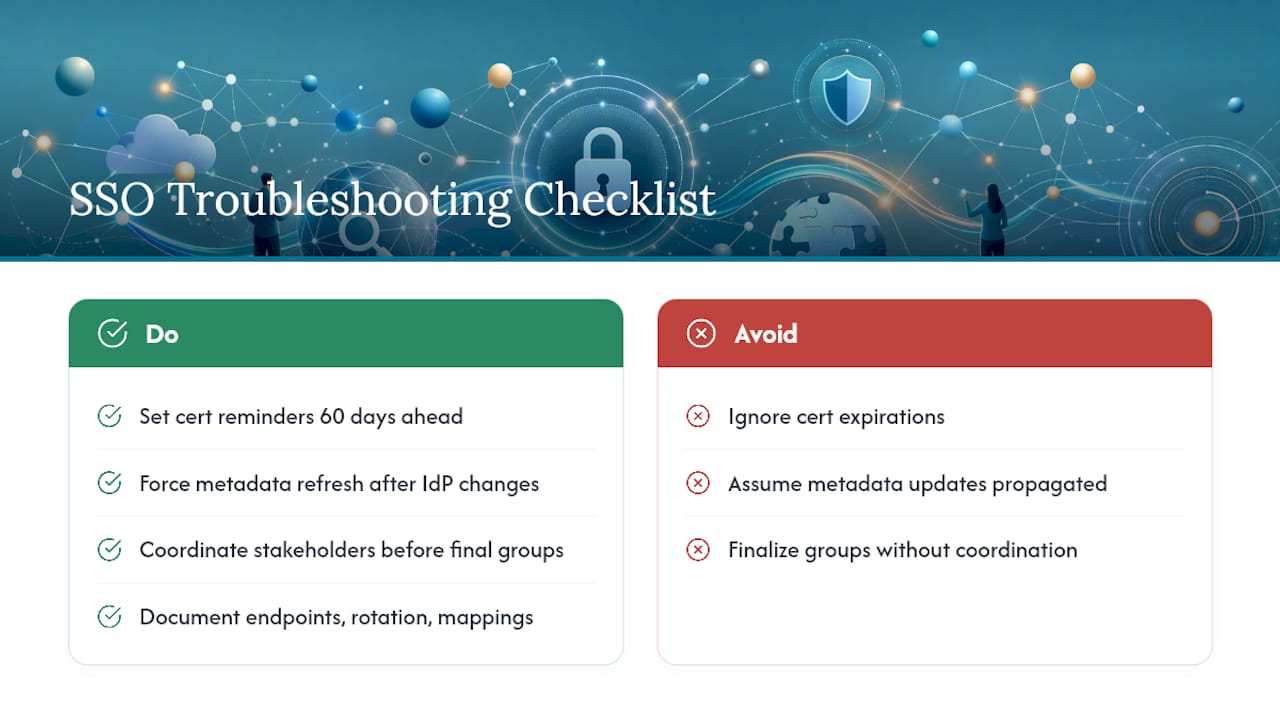
Certificate expiration deserves more respect than it typically gets. It's not a dramatic failure. Authentication just stops working one morning, and the error message rarely says "your certificate expired three days ago." It says something vague about an invalid signature, and someone spends an hour debugging a permissions issue that isn't a permissions issue at all. Put a calendar reminder on every certificate's expiration date, sixty days out, not the day it dies.
Metadata caching causes a similar kind of confusion. Some portals cache IdP metadata aggressively for performance, which means you can update your Okta or Entra configuration correctly and still see login failures for hours because the portal is authenticating against an old certificate fingerprint. When troubleshooting after any IdP-side change, force a metadata refresh before assuming the new configuration is broken.
Hybrid identity, on-prem AD syncing to a cloud directory, introduces its own quiet failure mode: a user principal name that doesn't match the email suffix your portal expects. This isn't a bug so much as a mismatch between how your domain was set up years ago and how your IdP expects things to look today. Coordination matters here more than technical skill. Get IT, security, and the lab managers who actually understand staffing patterns into the same conversation before you finalize group structures, because the people running day-to-day lab operations know things about staff rotation and access needs that rarely show up in a technical requirements document. And whatever you build, document it. Write down the exact metadata endpoints, certificate rotation schedule, and mapping logic somewhere your whole team can find it, because the person who configured this integration will not be the person troubleshooting it eighteen months from now.
How Does Labrynix Support SSO for Lab Portals?
If you're evaluating whether your lab's LIMS and portal software can actually deliver on everything covered above, that's exactly the gap Labrynix was built to close. The platform supports both SAML 2.0 and OIDC out of the box, with attribute and claim mapping configured during onboarding so your Entra ID or Okta groups translate directly into portal roles, not a generic default permission set you have to rebuild manually.

Labrynix's implementation team works through the same setup process outlined in this guide alongside your IT staff: registering the application with your identity provider, mapping groups to lab roles like technician, administrator, and read-only reviewer, and running a pilot with a small user group before full rollout. Audit logging is built into the platform, so every authentication event and role assignment sits in one place instead of scattered across separate portal logs, and interoperability tools support HL7, FHIR, and API connections for labs that need SSO to fit into a broader system of connected instruments and EHR integrations. If your lab is evaluating a LIMS platform built for genetic and molecular testing with SSO support already accounted for, reach out through the Labrynix LIMS product page to talk through your identity provider and get a configuration walkthrough scheduled.
Where to Read the Original Documentation
Before you finalize a configuration, verify the current setup steps against the identity provider's own documentation, since interfaces and required permissions change over time.
- Azure AD Connect sync documentation covers exactly how on-prem Active Directory synchronizes with Entra ID, essential reading before any hybrid identity setup.
- Microsoft Azure's identity services overview is the starting point if your lab is evaluating Entra ID as a new IdP.
- Just-in-time provisioning versus SAML SSO breaks down the tradeoffs between provisioning models in more technical depth than covered here.
- Clock synchronization guidance for SSO environments explains the NTP configuration details behind one of the most common SAML failure modes.
- Healthcare compliance audit trail fundamentals is worth reviewing when building out your logging and access review policies.
Frequently Asked Questions
Can a lab portal use both SAML and OIDC at the same time? Yes. Many portals, including Labrynix, support both protocols simultaneously, which matters if different departments or partner organizations standardize on different identity providers.
Do we need Global Administrator access to set up Entra ID SSO? Typically yes, at least for the initial consent and directory permission grant. After that, day-to-day management can often be delegated to an application administrator role.
What happens if a user's group membership changes after they've already logged in? It depends on session length and token refresh behavior. Most portals apply role changes on the next login or token refresh, not mid-session, so a permission change may not take effect immediately.
Is authentication-only SSO less secure than full provisioning? Not inherently. Authentication-only shifts more manual control to your IT team, while provisioning automates lifecycle management. The security level depends on how consistently either approach is maintained, not which one you choose.
How often should SAML certificates be rotated? This varies by IdP, but plan for a proactive rotation schedule rather than waiting for an expiration notice, and always re-import updated metadata on the portal side immediately after rotation.