
Lab API integration connects your laboratory's instruments, LIMS, ELN, EMR, and reporting systems so data moves programmatically instead of through manual entry or file exports. The immediate next steps: pick your integration pattern (FHIR R4, REST, HL7 v2, or webhook), locate the API documentation and sandbox credentials, assign a product owner, and map two or three priority workflows before writing a single line of code.
Start here before anything else:
- Identify your two or three highest-value flows: order submission, result retrieval, or instrument data capture
- Request sandbox access and API credentials from your target system or vendor
- Assign a named product owner who bridges clinical, IT, and vendor stakeholders
- Pull the OpenAPI/Swagger spec and review endpoint schemas before scoping development
- Map your internal test codes to the lab compendium or LOINC codes the API expects
Pro Tip: Validate your test-code mappings in the sandbox before submitting a single production order. A mismatch between your internal codes and the compendium codes the API expects is the most common reason orders fail silently at the routing layer.
Key Takeaways
Successful lab API integration requires mapping internal test codes to external compendia before development starts, validating every flow in a sandbox, and assigning a named product owner who stays accountable through go-live and beyond.
| Point | Details |
|---|---|
| Map codes before you build | Align internal test codes to LOINC and the lab compendium before writing integration code to prevent silent order failures. |
| Sandbox is permanent | Treat the sandbox as a long-term fixture for validating new flows, API version upgrades, and edge-case specimens. |
| Use async for order submission | POST orders asynchronously with idempotency keys; poll or subscribe for status rather than waiting on a synchronous response. |
| Secure from day one | Implement OAuth2, TLS, RBAC, and immutable audit logs before connecting any PHI-bearing endpoint to production. |
| Labrynix Connect | Labrynix supports HL7, FHIR, REST, and webhooks in one platform with sandbox access and compendium mapping support included. |
Table of Contents
- What API types are actually used in labs, and when?
- What can you actually automate with lab APIs?
- How to implement a lab API integration from discovery to go-live
- Authentication, security, and compliance for lab API integrations
- Which integration pattern fits your workflow: sync, async, or webhooks?
- How to test your integration before it touches production
- What does running a lab integration actually cost and how long does it take?
- How Labrynix handles API integration in practice
- What lab integration projects actually teach you
- Labrynix makes integration a first-class part of your lab platform
- Standards, docs, and reference links to consult first
- Sources
What API types are actually used in labs, and when?
An API (Application Programming Interface) is a defined contract that lets two software systems exchange data and trigger actions without human intervention. In a lab context, that means an EMR can submit an order directly to your LIMS, or your instrument can push a result to a reporting module the moment analysis completes.
The five patterns you will encounter in lab work:
- REST (Representational State Transfer): The dominant pattern for modern lab software. Uses standard HTTP verbs (GET, POST, PUT, DELETE) over HTTPS. Most LIMS, ELN, and instrument vendors now expose RESTful API endpoints with OpenAPI/Swagger documentation. Fast to develop against, easy to test with tools like Postman or curl.
- FHIR R4 (Fast Healthcare Interoperability Resources): The structured clinical standard for healthcare data exchange. FHIR defines specific resources — ServiceRequest, DiagnosticReport, Observation, DocumentReference — that map cleanly to lab order and result workflows. Adoption is accelerating because FHIR provides subscription-based notification patterns and structured result resources that generic REST does not mandate. See the HL7 vs FHIR comparison for a plain-English breakdown of the trade-offs.
- HL7 v2 (Health Level Seven version 2): The legacy pipe-delimited message format still running in most hospital labs and reference labs. ORM messages carry orders; ORU messages carry results. Many integration engines (Mirth Connect, Rhapsody) translate HL7 v2 to REST or FHIR internally. Expect it wherever you connect to older hospital systems or reference lab networks.
- SOAP: An older XML-based protocol. You will encounter it in legacy billing systems and some reference lab interfaces, but new integrations rarely start here. Budget extra time for WSDL parsing and XML schema validation.
- Webhooks / event subscriptions: Instead of polling an endpoint repeatedly, the remote system sends an HTTP POST to your callback URL when something changes — an order status update, a result ready notification, or an instrument alarm. FHIR Subscriptions formalize this pattern for clinical workflows.
Synchronous vs. asynchronous — why it matters for labs:
Synchronous calls return a response immediately. That works for short lookups: checking a patient record, validating a specimen ID, or retrieving a single result. Order submission is different. A lab order typically requires routing, compendium validation, and sometimes manual review before it is accepted. Submitting synchronously and waiting for a final acceptance response can time out. The better pattern is asynchronous: POST the order, receive an acknowledgment with a request ID, then poll or subscribe for the final status.
Metadata standards and identifiers to plan for:
- LOINC codes: The standard vocabulary for lab test identification. Your internal test codes must map to LOINC before most clinical API integrations will accept them.
- SNOMED CT / specimen concepts: Used to describe specimen type and collection method in FHIR resources.
- Lab compendia: The vendor's or network's published catalog of orderable tests, each with required fields, specimen requirements, and result formats. Map to the compendium early — gaps here block go-live.
- ISA-Tab metadata standard: Relevant for molecular and omics labs exchanging assay metadata between LIMS, ELN, and downstream analysis pipelines. Captures experimental design, assay parameters, and provenance in a structured format.
What can you actually automate with lab APIs?
The highest-value integrations share a common trait: they eliminate a manual handoff that currently requires a person to copy, re-key, or export data. Here are the flows worth prioritizing.
Order and result flows (highest ROI):
- EMR-to-lab order submission: A provider places an order in the EMR. The API transmits it directly to the LIMS as a structured ServiceRequest (FHIR) or ORM message (HL7 v2). The LIMS accessions the sample automatically. No fax, no manual entry, no transcription errors.
- Structured result delivery (lab-to-EMR): Once a result is finalized, the API pushes a DiagnosticReport or ORU message back to the ordering EMR. The provider sees results in their workflow without logging into a separate portal. For PGx labs, this includes the pharmacogenomics interpretation alongside the raw genotype.
- Order status and tracking: Providers query order status in real time — specimen received, in process, resulted — without calling the lab. Reduces inbound call volume significantly.
Instrument and data capture flows:
- Instrument result ingestion: Sequencers, PCR platforms, and digital PCR instruments like the QIAcuity expose RESTful endpoints over HTTPS that allow the LIMS to pull run data automatically. The instrument API key is generated in the vendor software suite and must be enabled before third-party automation can connect. This eliminates manual result transcription from instrument software to LIMS.
- ELN-to-LIMS sync: Experimental protocols, reagent lot numbers, and analyst notes recorded in the ELN flow into the LIMS automatically, keeping the sample record complete without duplicate entry.
Operational and reporting flows:
- Inventory and reagent tracking: API calls update reagent inventory when a run consumes materials, trigger reorder alerts when stock falls below threshold, and log lot numbers against sample records for traceability.
- Automated reporting and dashboarding: Finalized results trigger report generation via the reporting API. For genetic and PGx labs, this means the report module receives the structured genotype result and populates the interpretation template automatically. The sample-to-report workflow shows where API calls remove the most manual steps.
- Billing handoff: Order metadata and result codes pass to the billing platform via API, reducing claim preparation time and coding errors.
Pilot suggestions for genetic and molecular labs:
- Order accessioning pilot: Connect one EMR or ordering portal to your LIMS via FHIR ServiceRequest. Validate that orders arrive with correct patient demographics, test codes, and specimen requirements. Run 50 test orders in sandbox before any production volume.
- PGx report retrieval pilot: After a PGx result is finalized in the LIMS, trigger the reporting API to generate the structured report and push it back to the ordering provider's portal. This single flow eliminates the most common manual bottleneck in precision medicine labs.
- Instrument data capture pilot: Connect one high-volume instrument to the LIMS via its vendor API. Validate that run data, including sample IDs and result values, maps correctly to open accessions.
How to implement a lab API integration from discovery to go-live
A staged approach prevents the most common failure mode: building against an API before you understand the data model, then discovering mapping gaps two weeks before go-live.
1. Discovery and scoping
Define the two or three priority flows, the systems involved, the data elements each flow requires, and what "done" looks like. Name a product owner who can make decisions across clinical, IT, and vendor stakeholders. Document success metrics: order error rate, result turnaround time, manual touchpoints eliminated.
2. Design and mapping
Map every internal test code to the compendium or LOINC equivalent the API expects. Define required order fields (patient demographics, provider NPI, specimen type, priority). Design your idempotency strategy: each order submission should carry a unique client-generated ID so retries do not create duplicate orders. Good REST API design — consistent status codes, clear resource naming, and versioned endpoints — reduces the maintenance burden you inherit after go-live.
3. Authentication and environment setup
Configure API credentials before touching any endpoint. Most modern lab APIs use one of two patterns: an API key passed in a request header (common for instrument-level access), or OAuth2 access tokens with defined scopes (preferred for clinical data APIs carrying PHI). Request sandbox credentials and compendium access at the same time — waiting on sandbox provisioning is a common schedule killer.
Treat your sandbox environment as a permanent fixture, not a temporary scaffold. Every new flow, every API version upgrade, and every edge-case scenario should be validated there before it touches production data.
4. Development and integration
Use the OpenAPI/Swagger specification to explore endpoint schemas and test requests interactively. Build your POST handlers for order submission and GET handlers for result retrieval. For the FHIR R4 order flow, the sequence is: POST a RequestGroup containing ServiceRequest resources, receive a RequestResult, poll for status, then GET the DiagnosticReport or Observation once results are available. Implement OperationOutcome parsing so your system handles validation errors, routing failures, and partial successes explicitly rather than treating every non-200 response as a generic error.
5. Validation and go-live
Run end-to-end scenarios in sandbox: accepted orders, rejected orders (invalid codes, missing fields), results with multiple observations, and results with attachments (PDF reports via DocumentReference). Reconcile order IDs and result identifiers between systems. Define your rollback plan — what happens if the integration fails during the first week of production — and confirm support ownership with your vendor before cutover.
Pro Tip: Before go-live, run a reconciliation report that compares every order submitted via API against every accession created in the LIMS. Any gap in that reconciliation is a silent failure you need to find before it affects patient care.
Authentication, security, and compliance for lab API integrations
Security is not a layer you add after the integration works. It is a design constraint from day one, especially when the data includes PHI.
Authentication patterns:
- API keys: Simple and fast to implement. Appropriate for instrument-level integrations on isolated internal networks. Not appropriate for external-facing clinical data APIs — a leaked key grants full access with no expiration.
- OAuth2 access tokens: The right choice for any integration that touches PHI or crosses a network boundary. Tokens are scoped (limit what the client can read or write), short-lived, and revocable without changing credentials. Use the client credentials flow for server-to-server integrations; use authorization code flow when a human user is in the loop.
- Scope management: Request only the scopes your integration actually needs. An order submission client does not need result write access. Narrow scopes limit blast radius if credentials are compromised.
Transport and network security:
- Enforce TLS 1.2 or higher on every connection, inbound and outbound. Reject unencrypted connections at the gateway.
- Use IP allowlists to restrict which source addresses can reach your inbound API endpoints.
- Place inbound endpoints behind a secure API gateway or reverse proxy — never expose your LIMS or instrument directly to the public internet.
- For instrument-level integrations, review firewall rules carefully. Labs frequently discover that instrument vendor software requires specific inbound ports that conflict with existing network policy.
Access control and auditability:
- Implement role-based access control (RBAC) so each integration client has only the permissions its function requires.
- Maintain immutable audit logs of every API call: timestamp, caller identity, endpoint, request payload hash, and response code. These logs support HIPAA compliance reviews, CAP/CLIA inspections, and incident investigations.
- Keep production and sandbox credentials strictly separated. A sandbox credential that can reach production data is a compliance finding waiting to happen.
HIPAA-conscious controls for U.S. clinical labs:
- Encrypt PHI at rest and in transit. Confirm your API vendor's Business Associate Agreement (BAA) status before sending any patient data.
- Implement minimum necessary access — the API should return only the data elements the requesting system needs.
- Retain audit logs for the period your compliance program requires (typically six years for HIPAA-covered entities).
- Document your integration architecture, data flows, and access controls to support risk assessments and accreditation reviews.
Pro Tip: Review the Labrynix security controls page before your next vendor evaluation. The checklist of HIPAA-conscious controls, audit logging, and RBAC configuration it describes maps directly to what CAP and CLIA inspectors ask about.
Which integration pattern fits your workflow: sync, async, or webhooks?
Choosing the wrong pattern for a workflow creates reliability problems that are hard to fix after go-live. Here is how to think through the decision.
Synchronous request/response works when the operation completes quickly and the caller needs an immediate answer. Specimen ID validation, patient lookup, and result retrieval for already-finalized results are good candidates. The caller sends a request and waits for the response before proceeding.

Asynchronous polling is the right pattern for order submission. The caller POSTs the order, receives an acknowledgment with a tracking ID, then polls a status endpoint at intervals until the order is accepted, rejected, or routed. This decouples the caller from the processing time of the lab's routing and validation logic.
Webhooks and FHIR Subscriptions invert the polling model. Instead of your system asking "is it done yet?" every 30 seconds, the remote system notifies your callback endpoint the moment something changes. This is more efficient at scale and reduces unnecessary API calls, but it requires you to operate a reliable, publicly reachable HTTPS endpoint and handle retries when your endpoint is temporarily unavailable.
Sequence for the FHIR R4 order-to-result flow:
- POST
/fhir/R4/RequestGroupwith embedded ServiceRequest resources - Receive HTTP 202 and a RequestResult reference
- Poll
GET /fhir/R4/RequestResult/{id}until status iscompletedorfailed - On completion, GET
/fhir/R4/DiagnosticReport/{id}or/fhir/R4/Observation/{id}for structured results - For PDF reports, retrieve via
DocumentReference/Binaryendpoints
Idempotency and retry logic:
Include a client-generated idempotency key (a UUID) in every order submission. If the network drops after you POST but before you receive the acknowledgment, you can safely retry with the same key — the server returns the original response instead of creating a duplicate order. This is one of the most important design decisions in any order submission integration.
Pro Tip: Set your polling interval with exponential backoff: start at 5 seconds, double on each retry, cap at 60 seconds. Aggressive polling at fixed short intervals can trigger rate limiting and mask the real issue — a routing failure that needs human attention.
| Pattern | Latency | Reliability complexity | Best for |
|---|---|---|---|
| Synchronous | Immediate | Low | Lookups, validations, finalized result retrieval |
| Async polling | Minutes | Medium | Order submission, pending result status |
| Webhook / Subscription | Near real-time | Higher (requires stable callback) | Result notifications, status events at scale |
How to test your integration before it touches production
Testing is where most integration projects either save themselves or create expensive problems. A sandbox is not optional.
Functional test cases to run in sandbox:
- Submit a valid order with all required fields — confirm acceptance and a valid request ID returned
- Submit an order with an unmapped test code — confirm the API returns a meaningful OperationOutcome error, not a silent failure
- Submit an order with missing required demographics — confirm rejection with a specific field-level error
- Poll for result status on a pending order — confirm the status transitions correctly through routing states
- Retrieve a finalized DiagnosticReport — confirm all Observation values, units, and reference ranges are present
- Retrieve a PDF result via DocumentReference — confirm the binary attachment is accessible and intact
- Submit a duplicate order with the same idempotency key — confirm the server returns the original response without creating a second accession
Sandbox best practices:
- Mirror your production compendium mappings in the sandbox exactly. A mapping that works in sandbox against a test compendium but fails in production against the real one is a common go-live surprise.
- Validate your OperationOutcome parsing against every error code the API documentation describes — not just the happy path.
- Test timezone edge cases explicitly: submit orders with timestamps near midnight UTC and confirm the LIMS records the correct local date. Timezone mismatches between instruments and LIMS corrupt data lineage in ways that are hard to detect after the fact.
Rollout strategy:
- Run the full sandbox test suite and resolve all failures before requesting production credentials
- Pilot with a defined volume of real orders (typically 25–100) from a single ordering location
- Reconcile every pilot order: confirm each API order ID maps to exactly one LIMS accession and one result
- Escalate any reconciliation gaps immediately — do not expand volume until the gap is explained and closed
- After a clean pilot period (typically one to two weeks), expand to full volume with monitoring in place
Pro Tip: Keep a test specimen library in your sandbox that covers edge cases: pediatric patients, multiple specimens on one order, stat priority orders, and orders with add-on tests. These edge cases are where integration failures hide.
What does running a lab integration actually cost and how long does it take?
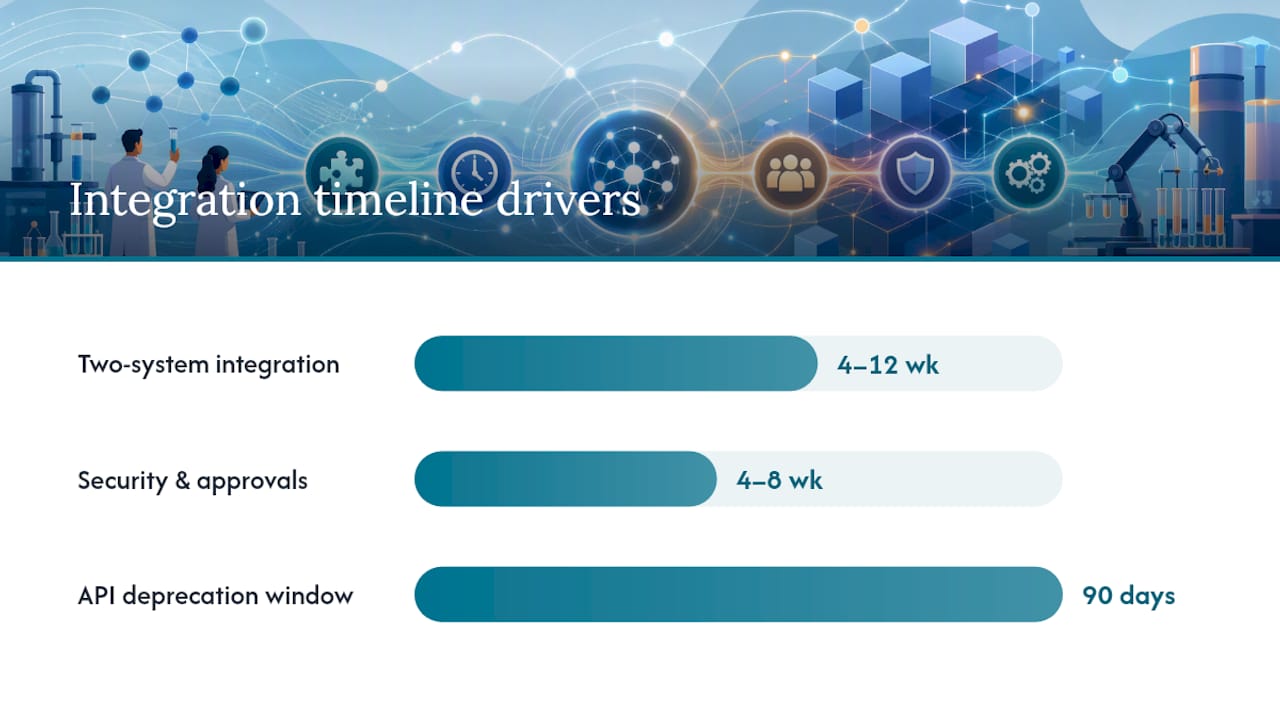
Realistic expectations here prevent the most common project failure: a timeline that assumed everything would go smoothly.
Ownership and SLA considerations:
- Name a product owner on your side who is accountable for the integration end-to-end, not just the development phase. Post-go-live issues — a result that did not push, an order that silently failed — need someone who can triage across clinical, IT, and vendor channels without a committee meeting.
- Clarify vendor SLAs for sandbox and production support before signing. Specifically: what is the response time for a production order failure? Who owns the compendium mapping when a new test is added?
- Define your on-call rotation for integration monitoring. An integration that fails at 2 AM on a Friday needs a human who can act.
Monitoring and observability:
- Track order throughput, error rates, and end-to-end latency as operational metrics, not just development metrics.
- Alert on: failed order submissions, result delivery delays beyond your SLA threshold, and reconciliation gaps between API order IDs and LIMS accessions.
- Log every API call with enough context to reconstruct what happened: timestamp, order ID, endpoint, HTTP status, and error detail. Cloud-native lab integrations increasingly adopt governed ingestion pipelines that produce audit-grade lineage records — the same discipline applies to any production integration.
Versioning and change management:
- Subscribe to your vendor's API changelog and deprecation notices. An API version upgrade with a 90-day deprecation window can break your integration if no one is watching.
- Pin your integration to a specific API version in your configuration, not "latest." Upgrade deliberately, test in sandbox first, and deploy with a rollback plan.
Timeline and cost drivers:
- Legacy system complexity: Connecting to an older HL7 v2 interface engine adds translation and mapping work that a native REST integration does not require.
- Code mapping scope: A lab with 50 orderable tests maps faster than one with 500. Every unmapped test is a manual exception until it is resolved.
- Security review and approval cycles: In hospital environments, firewall rule changes and network security reviews routinely add four to eight weeks to a timeline.
- Engineering hours: A focused two-system integration (one EMR, one LIMS, two flows) typically takes four to twelve weeks of engineering time depending on complexity. Multi-system integrations with custom mapping and compliance reviews run longer.
- Vendor integration fees: Some vendors charge for sandbox access, compendium mapping support, or production integration tiers. Get this in writing during procurement.
How Labrynix handles API integration in practice
Labrynix Connect is the integration layer of the Labrynix platform, supporting HL7, FHIR, REST APIs, and webhooks for connections to EMR/EHR systems, billing platforms, CRM systems, lab instruments, and external applications. The platform is built around the complete sample-to-report workflow, so integrations are not bolted on — they are part of the core data model.
What Labrynix Connect supports:
- HL7 v2 order intake (ORM) and result delivery (ORU) for connections to hospital systems and reference lab networks
- FHIR R4 order submission and result retrieval using ServiceRequest, DiagnosticReport, and Observation resources
- REST API endpoints for LIMS workflow actions: order creation, accessioning, status updates, and result publication
- Webhook and event subscription support for real-time status notifications to ordering portals and EMR systems
- Role-based access control and immutable audit logging on all integration activity
- Sandbox environments for pre-production validation of order and result flows
Example workflow: EMR order to PGx report delivery
- The ordering provider submits a PGx panel order in the EMR
- Labrynix Connect receives the order via FHIR ServiceRequest or HL7 ORM and maps it to the internal test code and accession workflow
- The LIMS accessions the specimen, assigns workflow queues, and tracks sample status
- When analysis is complete, Labrynix Reports generates the branded PGx report using CPIC guideline support, PharmGKB annotations, and lab-approved interpretation rules
- Labrynix Connect pushes the finalized DiagnosticReport back to the EMR and notifies the provider portal
Implementation support Labrynix provides:
- Sandbox access and API documentation for pre-production testing
- Compendium mapping support to align internal test codes with LOINC and external lab compendia
- Integration consulting for scoping, design, and go-live planning
- Production support with defined response SLAs for integration issues
For genetic testing labs and molecular diagnostic labs, the combination of LIMS workflow management, PGx reporting, and Labrynix Connect integration support means you are not assembling three separate vendor relationships to cover what one platform handles end-to-end.
What lab integration projects actually teach you
The surprises in lab API integration projects are rarely technical. The code is usually the easy part.
The first recurring lesson: test-code mapping is almost always underestimated. Labs discover mid-project that their internal codes do not map cleanly to the compendium — some tests have no LOINC equivalent, some have multiple candidates, and some are lab-specific panels that need to be split into component codes for the API to accept them. The fix is to run the mapping exercise before development starts, not during it. Keep your canonical mapping table in version control alongside your integration code. When a new test is added to the menu, the mapping update and the code change ship together.
The second: timezone handling is invisible until it is not. Instruments log timestamps in local time without timezone metadata. The LIMS records in UTC. The EMR displays in the provider's local timezone. When those three clocks disagree, you get results that appear to predate the order, or collection timestamps that shift by a day at midnight UTC. Normalize timestamps and store timezone metadata explicitly during the initial mapping design — retrofitting this after go-live is painful.
The third lesson is stakeholder alignment. Clinical staff, lab directors, IT, and the ordering provider's IT team all have legitimate requirements that can conflict. The lab director wants the report format to match their existing template. The EMR team wants a specific FHIR profile. IT wants network changes reviewed by security. None of these conversations should happen for the first time during development. Get all stakeholders in the same room during discovery, even if it takes two extra weeks. It saves two months later.
One non-obvious pro tip: test with your most complex specimen types first, not your simplest. A straightforward blood draw with a single test is easy. A saliva specimen with a multi-gene PGx panel, a stat priority flag, and a pediatric patient record is where the integration either holds or breaks. Find out in sandbox.
Labrynix makes integration a first-class part of your lab platform
Labs that have spent months stitching together a LIMS, a reporting tool, and a separate integration middleware know the real cost: every vendor update is a potential breakage, every new test requires a mapping update in three places, and no one person owns the full picture.

Labrynix is built differently. Labrynix Connect, LIMS, and Reports share a single data model, so an order that arrives via FHIR or HL7 flows directly into accessioning, through the workflow queue, and into PGx report generation without crossing a middleware boundary. Sandbox access, compendium mapping support, and integration consulting are part of the engagement — not add-ons you negotiate separately. For labs building their first clinical API integration or replacing a fragile point-to-point connection, that single-platform approach cuts both the implementation timeline and the long-term maintenance surface.
Request sandbox access or schedule a technical discovery call through the Labrynix solutions page to see the integration layer in a working environment before committing to a scope.
Standards, docs, and reference links to consult first
Clinical standards and API specifications:
- FHIR R4 Lab Network API implementation guide — covers RequestGroup/ServiceRequest order submission, RequestResult polling, DiagnosticReport/Observation retrieval, and Subscription setup
- Labrynix API documentation — HL7, FHIR, and Labrynix platform endpoint reference for integration engineers
- HL7 vs FHIR for Laboratories — plain-English comparison of HL7 v2 and FHIR trade-offs for clinical lab workflows
Metadata standards and identifier resources:
- ISA-Tab metadata standard — structured format for capturing assay, sample, and experimental metadata in LIMS and ELN workflows
- ORCID persistent identifiers — contributor and researcher identifiers for provenance and record reconciliation in lab data workflows
- LOINC (loinc.org) — the standard vocabulary for lab test identification; required for most clinical API integrations
Developer manuals and instrument API references:
- QIAcuity Lab Automation Service User Guide — RESTful HTTPS endpoints and API key setup for instrument-level automation
- REST API design best practices — resource modeling, status codes, idempotency, and versioning guidance for maintainable integrations
- API-first LIMS and integration services overview — industry context on governed ingestion pipelines and FHIR readiness in cloud-native lab platforms